

Etsy Shop Banner Size 2026: Pixels and Ratio
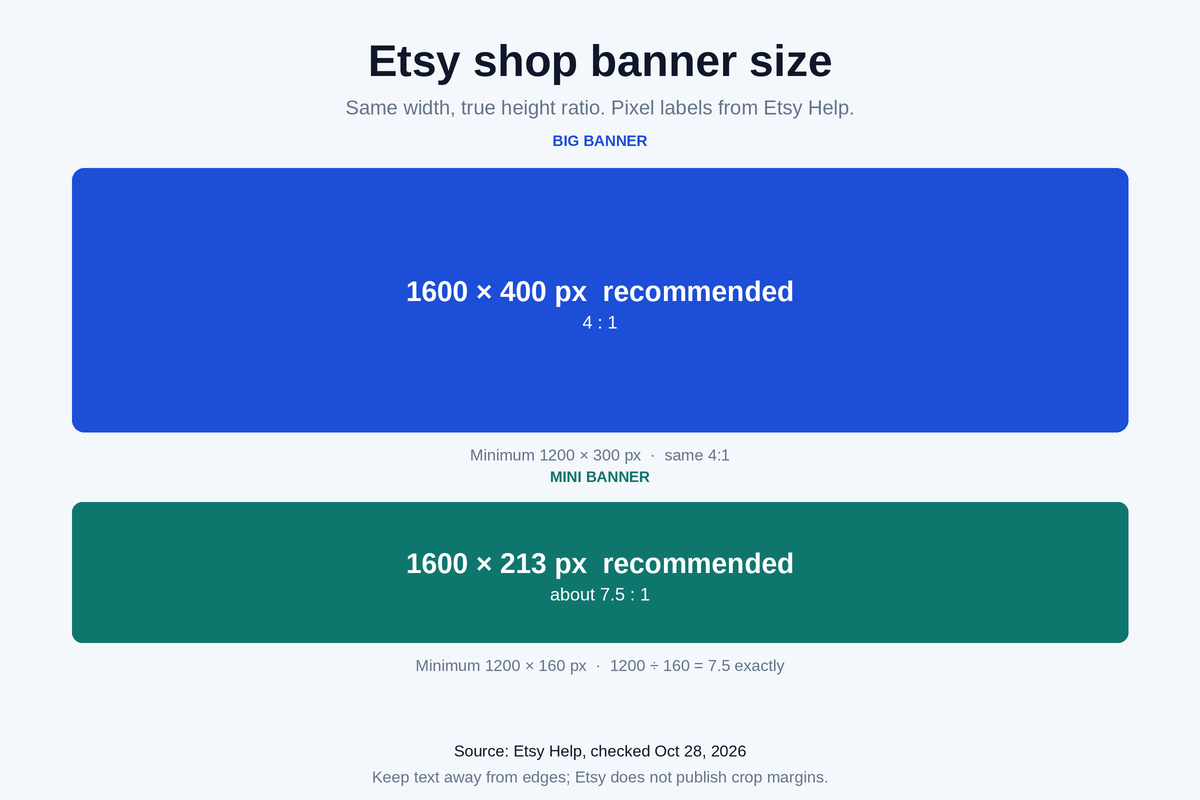
Big banner minimum 1200×300 px, recommended 1600×400. Mini banner minimum 1200×160 px, recommended 1600×213. Ratios and which file to export.
Editor's picks
Features
A curated hub of AI tools and workflows for ecommerce & POD sellers. Updated regularly with reviews, tutorials and example images.
Read how mockup and image tools handle product images, with Etsy sellers as the main focus.
We compare background removers, mockup generators, and product photo enhancers—so you can see how they differ on pricing and features.
Follow clear guides that show you how to create professional product photos, banners, and mockups—even if you’re not a designer. The Etsy shop banner size guide lists the 2026 pixel sizes for the big banner and the mini banner.
Step-by-step workflows and side-by-side comparisons, written from official docs, pricing pages and user reviews.
Learn AI-powered processes tailored for print-on-demand sellers: apparel, mugs, posters, phone cases, and more.
Get unbiased reviews of AI tools, pricing breakdowns, pros/cons, and the best alternatives for different types of sellers.
Inside template
Featured
Our current reviews of mockup and branding tools for ecommerce & POD sellers. Before you upload those mockups, check the Etsy title character limit, how many tags on Etsy, how to price handmade items on Etsy, and the Etsy listing video requirements.
Bulk mockup generation for POD & Etsy sellers: PSD smart objects, AI photoshoots, pricing/credits, and alternatives.
Logos, mockups, and short promo videos for Shopify/Etsy/POD sellers, plus free vs paid export limits and alternatives.
A comparison of 6 Placeit alternatives by pricing, licensing, speed, and best use cases for ecommerce and POD.
Etsy research
Once your mockups are ready, these guides cover how to research what other Etsy shops list. Sales figures in the articles are estimates. See our EverBee review for reviews, comparisons, and how-tos. Listing photos use their own pixel spec: see the Etsy listing photo size guide.
What EverBee does, what the free Hobby plan includes, and when sales and revenue estimates start on a paid plan.
What Etsy shows for free in a shop header, what it hides at the listing level, and how research tools estimate the rest.
Search a niche in Product Analytics, sort by estimated sales, then check listing age, reviews, the shop, and tags.
How to open one competitor shop and read its listing table, including which sales columns need a paid plan.
New guides, reviews, and comparisons for Etsy, POD, and ecommerce sellers.
Big banner minimum 1200×300 px, recommended 1600×400. Mini banner minimum 1200×160 px, recommended 1600×213. Ratios and which file to export.
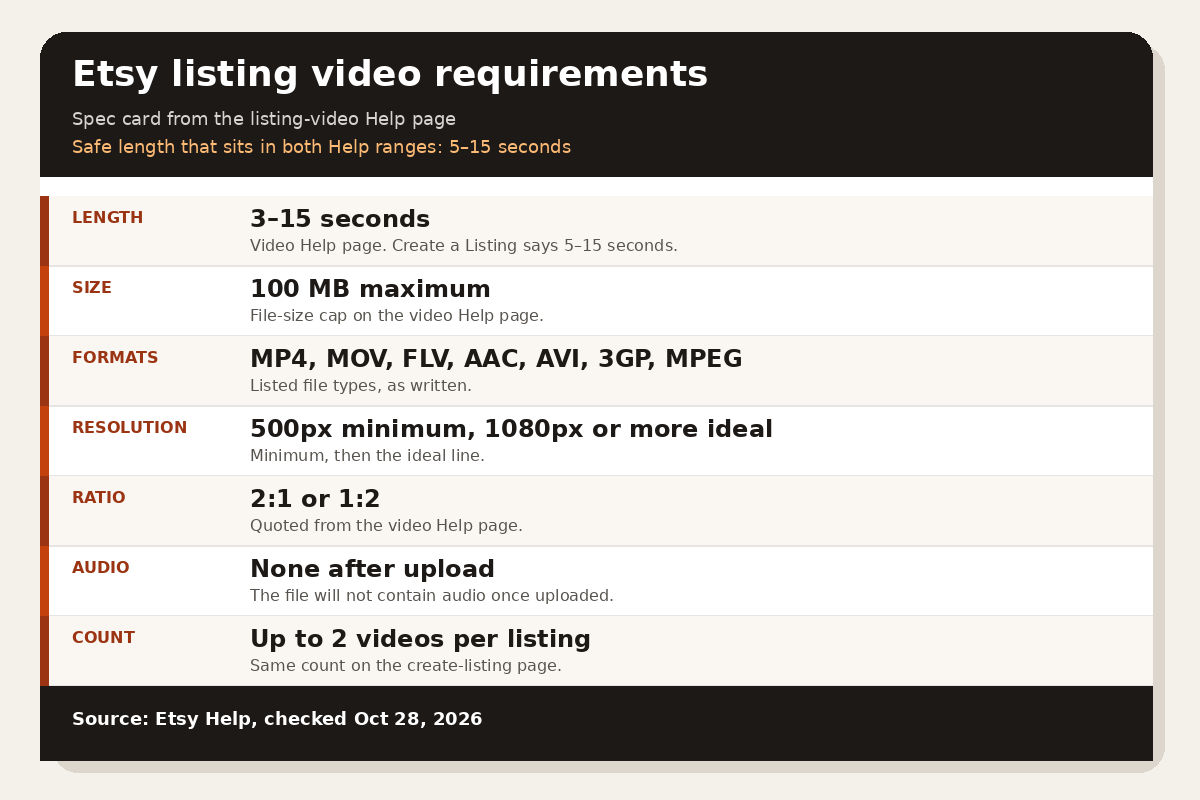
Etsy listing video requirements from Help, checked October 28, 2026: 3–15 seconds on the video page, 5–15 seconds on the listing page, 100 MB, and no audio after upload.
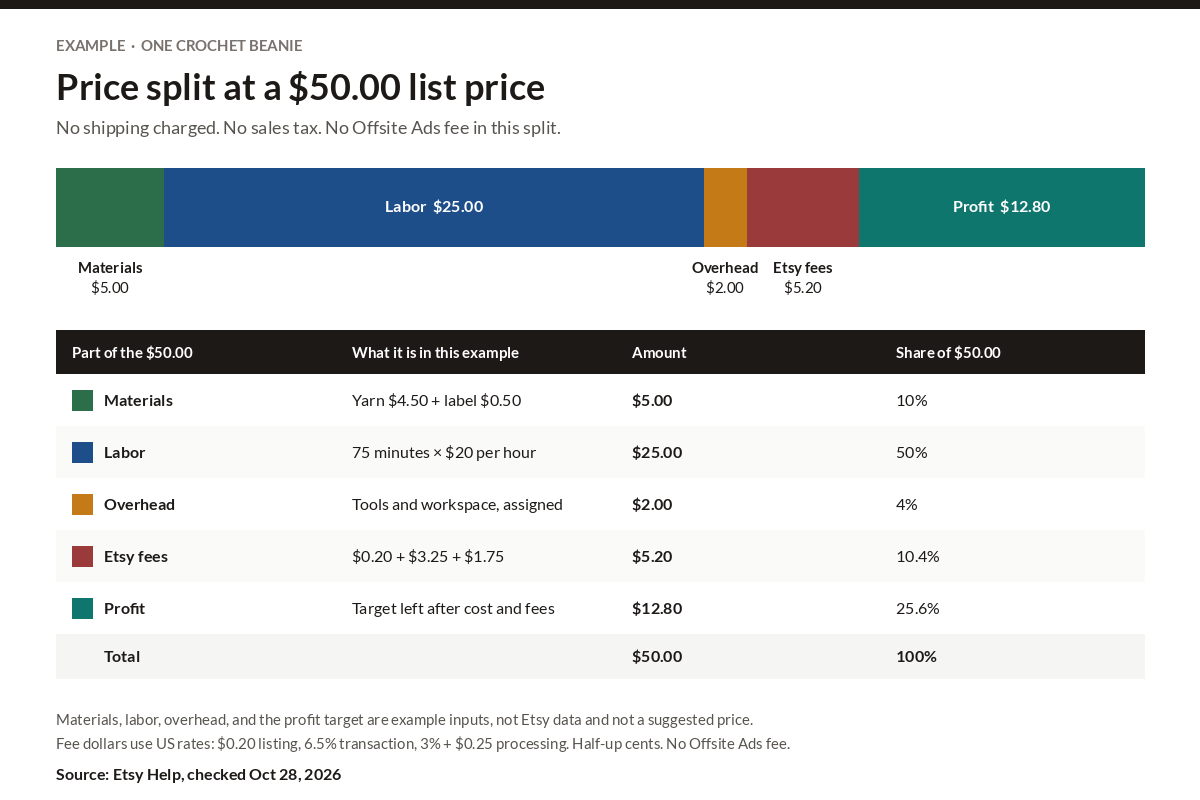
Add materials, labor, and overhead, then solve for a list price that keeps a target profit after the US listing fee, the 6.5% transaction fee, and 3% + $0.25 processing.
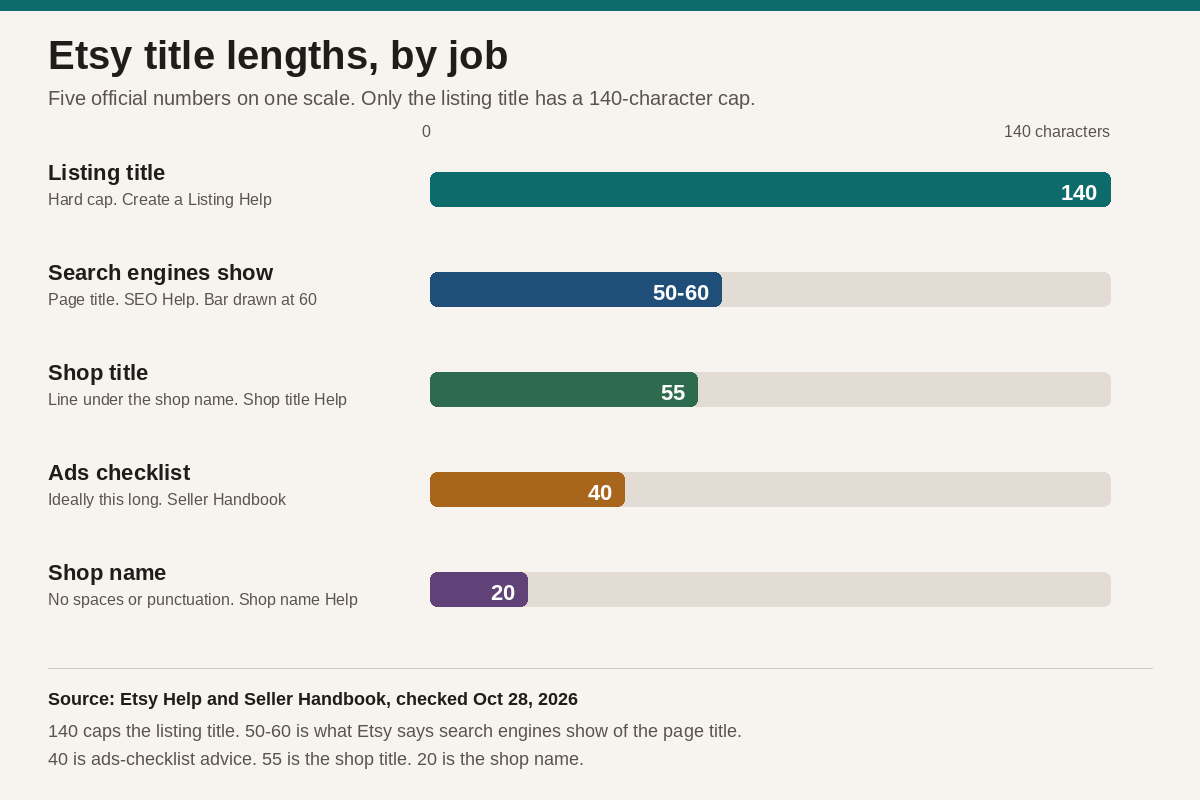
A listing title can be 140 characters. Etsy also publishes a 15-word suggestion, a 50-60 character search-engine window, and a Seller Handbook suggestion of about 40 characters or less for ads. The shop title is 55. The shop name is 20.
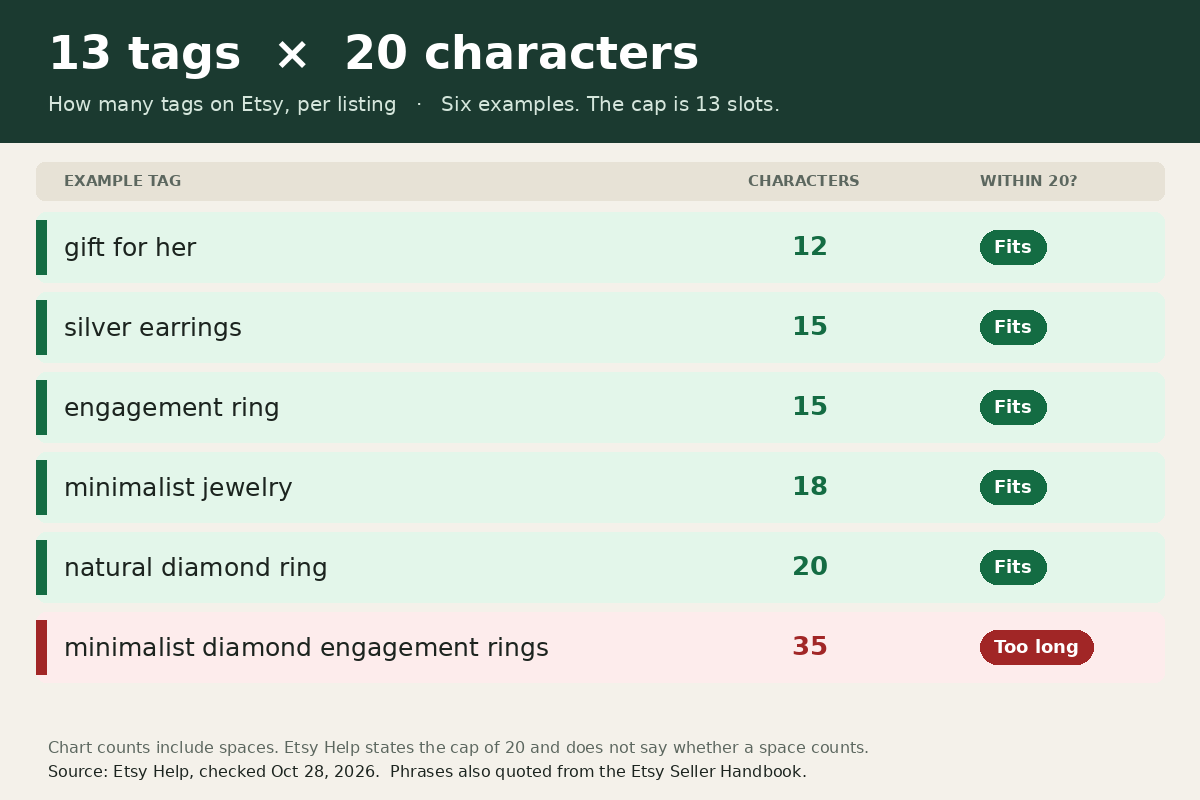
Each Etsy listing can use 13 tags of up to 20 characters. Character rules from Etsy Help, where tags sit next to attributes, and how to edit tags on the web, in the Seller app, and in bulk.
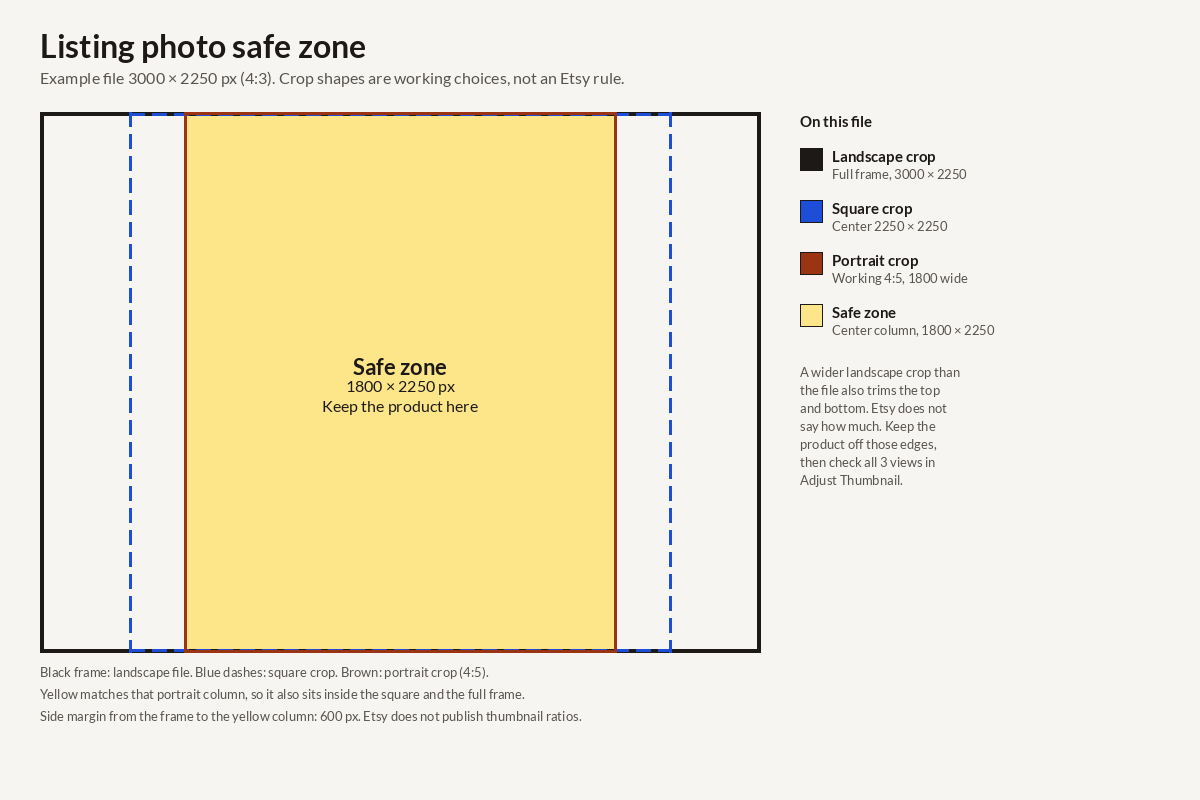
Etsy listing photo size in 2026: at least 2000 px on both sides, a 635 px floor on the first photo, and a centered product so thumbnail crops still show it.
FAQs
Answers to common questions about AI product photos, tools, and how SellerImageAI can help ecommerce & POD sellers.
SellerImageAI is a content and research hub focused on AI tools for ecommerce and POD sellers. We compare tools using official docs, pricing pages and user reviews, write tutorials, and share workflows that help you create better product photos without being a designer.
No. Most workflows on SellerImageAI are based on user-friendly AI tools that run in the browser. If you can upload an image, type a prompt, and click a few buttons, you can follow our guides.
Most guides are written for Etsy sellers. Some reviews include notes for Shopify and Amazon sellers.
Many tools offer free plans or free trials, and paid plans add more features or higher limits. In our reviews, we clearly explain the pricing, what’s included in each plan, and which option is best for different types of sellers.
Some of the links on SellerImageAI are affiliate links. If you sign up or purchase through those links, we may earn a commission at no extra cost to you. This helps us keep reviewing tools, writing tutorials and updating the site.
Start with basic workflows: cleaning backgrounds, fixing lighting, and generating simple mockups. Read one tutorial from our “Getting started” section, apply it to a few products, and then slowly try more advanced tools and techniques.
Stop guessing which AI tool to try next. Use step-by-step workflows and honest reviews to choose the right tools for your product photos.