· ming · Guides · 8 min read
How to See Etsy Sales of Other Sellers (Free Ways + Tools, 2026)
Can you see how many sales an Etsy shop or listing has? Here's what Etsy shows publicly for free, what it hides, and how tools like EverBee estimate competitors' sales, plus how far to trust those numbers.
Affiliate disclosure: This guide contains affiliate links to EverBee. If you sign up for a paid plan through them, SellerImageAI may earn a commission at no extra cost to you. We don’t use affiliate links for any other tool mentioned here.
If you’re researching a niche before opening an Etsy shop, the first question is usually: how much are other sellers actually selling? Etsy shows some of this for free, hides the rest, and third-party tools fill the gap with estimates.
This guide explains each option and what it can and can’t tell you. It’s based on Etsy’s own Help Center and the tools’ official documentation. We haven’t run our own accuracy tests.
Quick answer
- Shop-level sales: yes, for free. Every Etsy shop shows a lifetime count of items sold in its shop header. Sellers can hide which items sold, but not the total.
- Listing-level sales: no, not directly. Etsy doesn’t publish how many units an individual listing has sold. You can infer it from reviews, badges and other signals, or use an estimation tool.
- Monthly sales and revenue: only as estimates. Tools like EverBee, eRank, Alura and ProfitTree model these numbers. None of them have access to Etsy’s private sales data.
Method 1: Check the shop’s total sales count (free)
Open any Etsy shop and look under the shop name. You’ll see a running total of sales for the life of the shop.
Etsy lets sellers hide their sold listings, so you may not be able to click through to see which items sold. However, Etsy’s Help Center is clear that the total stays visible: “The sales numbers of hidden listings will still be reflected in the tally of items sold seen in your shop header.”
How to turn the total into a rough monthly figure:
- Write down a competitor’s total sales count and the date.
- Check again a week or a month later.
- The difference is roughly how many items they sold in that period.
This is slow, but it’s free and based on Etsy’s own public number rather than a model. It works best on a short list of shops you really care about. Some tools automate this kind of tracking.
Limitations: the count is for the whole shop, so it won’t tell you which product is selling. It also counts items, not revenue.
Method 2: Look at sold listings, if the shop shows them (free)
If a seller hasn’t hidden their sold listings, clicking the sales count in the shop header shows recently sold items. This is the closest you can get to seeing what a competitor sells without a tool.
Many established sellers hide this list. Etsy’s Help Center explains the setting (Shop Manager → Settings → Options → Sold Listings → “No, hide them”), so don’t be surprised if the link isn’t clickable.
Method 3: Use reviews and badges as proxies (free)
When you can’t see listing-level sales, public signals on the listing page help:
- Review count and recency. Not every buyer leaves a review, so reviews undercount sales. Still, a listing that picks up new reviews every week is clearly selling.
- Badges such as “Bestseller” or “Popular now”. These suggest strong recent sales. Etsy doesn’t publish exact thresholds, so treat them as hints, not numbers.
- Listing age and favorites. A young listing with many favorites and reviews is a stronger signal than an old one with the same totals.
One caution: according to Etsy’s Help Center, a renewed listing gets a new listing date but keeps its original view count and favorites. So a listing’s “age” doesn’t always tell you how long it has really been selling. That affects your own judgment and any tool that divides sales by listing age.
Method 4: Use a sales estimation tool (free and paid)
Etsy research tools combine public signals into estimated sales and revenue for listings and shops. This is much faster than tracking by hand, and you can compare hundreds of listings at once.
EverBee
EverBee is the best-known example. Its Product Analytics shows estimated monthly sales, monthly revenue, total sales and conversion rate for listings that match a keyword. The free Chrome extension brings the data onto Etsy pages. EverBee’s Help Center explains that monthly sales are total sales divided by listing age, and monthly revenue is price × monthly sales. To look at one competitor’s whole shop instead of a keyword, EverBee’s Shop Analyzer lists that shop’s listings with the same estimates; see our EverBee Shop Analyzer guide.
What to know before you start:
- The free Hobby plan doesn’t show sales or revenue. On EverBee’s pricing page, Hobby includes views, reviews and favorites. Sales, revenue and conversion rate start on Growth.
- You don’t need an Etsy shop. EverBee says you can connect a regular Etsy buyer account.
- The numbers are estimates. EverBee’s own explainer calls them “a guide, not exact results.”
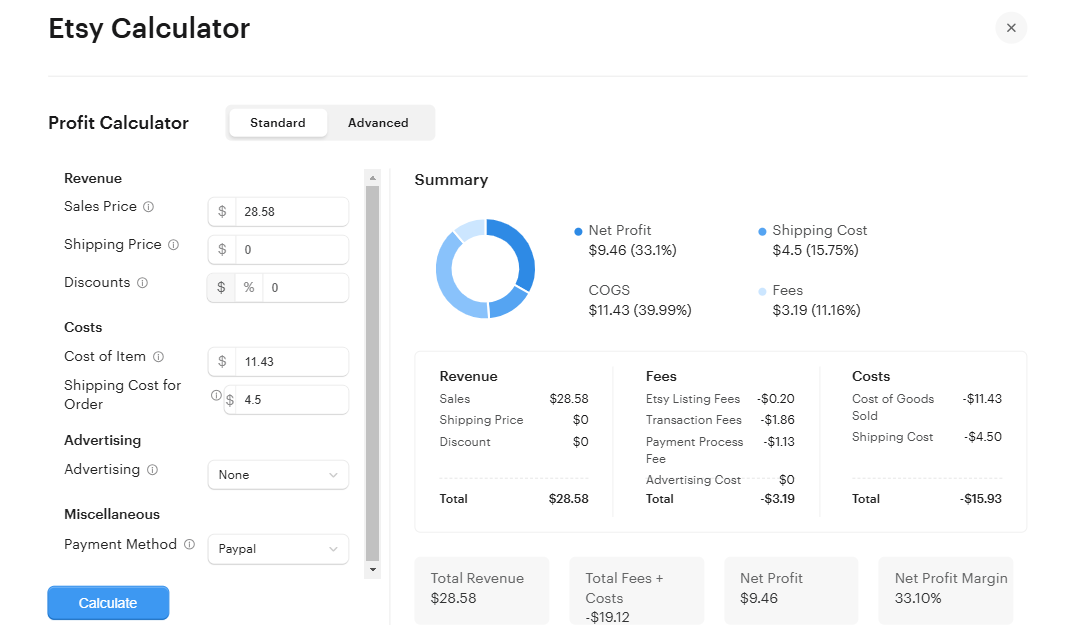
Image: EverBee’s Etsy profit calculator (official EverBee screenshot), which you can open from a listing row in Product Analytics (
Help Center: Product Analytics
). Figures are EverBee’s example data, not our test results. Once you have a competitor’s price, our EverBee Etsy Fee Calculator guide shows how to estimate your own margin at that price.
Other tools
- eRank: best known for Etsy SEO. Its pricing page lists tracking “the estimated daily number of sales for any Etsy shop” for monitored competitors. See EverBee vs eRank for beginners.
- ProfitTree: its website advertises product research with recent sales signals, competitor tracking and profit tracking for your own shop. See EverBee vs ProfitTree.
- Alura: an all-in-one Etsy suite whose pricing page mentions sales estimates in its extension.
If you choose EverBee for Method 4, our EverBee Chrome extension guide explains what each Product Analytics column means and what the free Hobby plan unlocks.
How accurate are Etsy sales estimates?
None of these tools can see Etsy’s internal sales records, so every number is a model. EverBee gives an example of how it can go wrong: a listing with lots of views and favorites but a poor conversion rate may be overestimated, and an unusually high converter may be underestimated.
Practical rules:
- Compare, don’t forecast. Estimates are most useful for ranking listings against each other in the same niche.
- Cross-check with free signals. If a tool says a listing sells hundreds a month but it barely has any reviews, be skeptical.
- Be careful with new and low-volume listings, where small errors make a big difference.
- Don’t mix numbers from different tools. Each one models data differently, so compare like with like.
What about your own shop’s sales?
If you already sell on Etsy, you don’t need estimates for your own shop. Etsy Stats in Shop Manager shows your real visits, orders, revenue and conversion rate, and you can view orders, revenue, views and favorites for each listing. For how those Etsy figures differ from EverBee’s estimates (including two different conversion-rate formulas), see EverBee vs Etsy’s free Shop Stats.
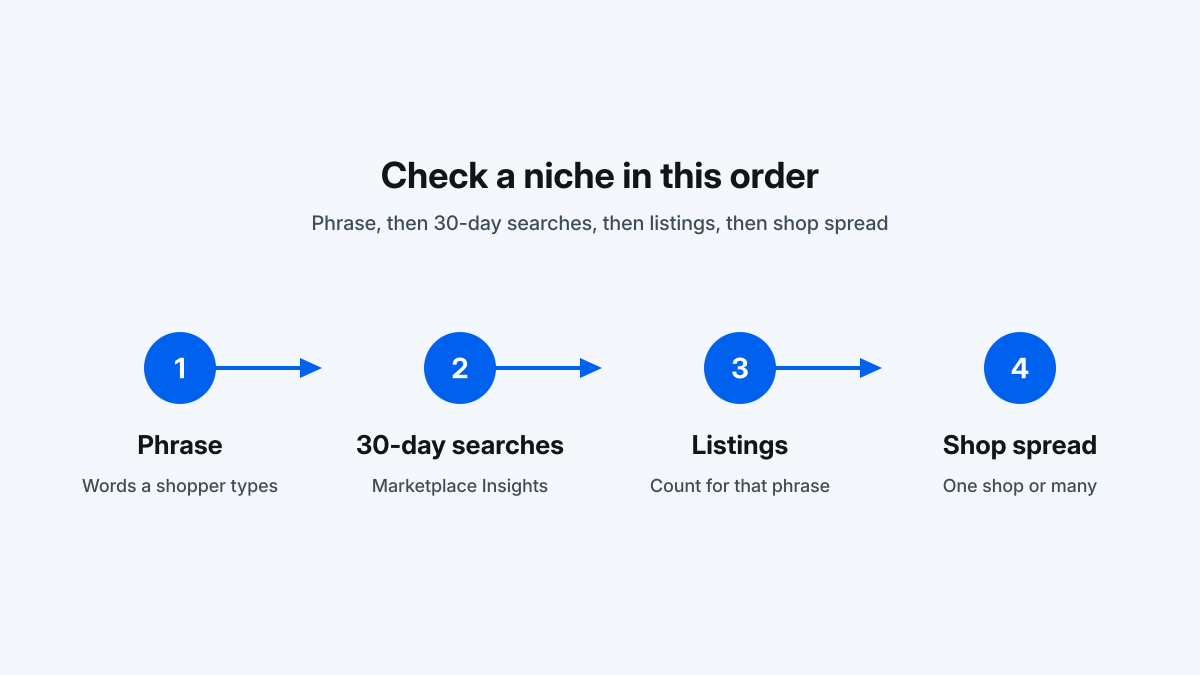
Etsy also now offers Marketplace Insights in Shop Manager → Stats. It shows real Etsy search data, such as the number of searches and listings for a keyword over the last 30 days. Sellers get 15 keyword searches per week for free. It covers keyword demand, not competitors’ sales, but it’s the most direct data Etsy provides.
Which method should you use?
| Your situation | Best starting point |
|---|---|
| Just exploring niches, no budget | Shop sales counts, sold listings, reviews and badges (Methods 1-3) |
| No shop yet, want listing-level estimates | EverBee with a buyer account. Paid Growth needed for sales/revenue |
| Already selling, want keyword data | Etsy Marketplace Insights plus an SEO tool such as eRank |
| Tracking a handful of competitors over time | Note shop totals by hand, or use a tool’s competitor tracking |
Once you know what sells, keyword choice matters. Our guide to how EverBee calculates Keyword Score explains how to read keyword competition. Your listing photos matter just as much: see our Dynamic Mockups review and Placeit alternatives for mockup tools.
Compare competitor listings with EverBee →
FAQ
Can you see how many sales an Etsy shop has?
Yes. The lifetime number of sales appears in every shop’s header. Sellers can hide which items sold, but Etsy still shows the total.
Can you see how many sales an Etsy listing has?
Not directly. Etsy doesn’t publish per-listing sales for other shops. Reviews, badges and favorites give clues, and tools like EverBee estimate listing sales.
Does Etsy show how many sales someone has?
For shops, yes: the total items sold. For individual products, no. You’ll only see indirect signals.
Can you hide your sales on Etsy?
You can hide your sold listings, but not your total sales count. Etsy’s Help Center says hidden sales still count toward the tally in your shop header.
How do I see an Etsy shop’s monthly sales?
Etsy doesn’t show monthly sales for other shops. You can record a shop’s total sales count over time and work out the difference, or use a tool that estimates monthly sales.
Are Etsy sales estimator tools accurate?
They’re estimates built from public signals, so treat them as directional. Use them to compare listings, not to predict exact income.
Last updated: October 10, 2026. Etsy features and tool pricing change often, so check the official pages linked above.