· ming · Guides · 13 min read
How to Use EverBee Keyword Research for Etsy: A Beginner Workflow (2026)
A step-by-step beginner workflow for EverBee Keyword Research: build a seed list, read search volume, competition and Keyword Score, shortlist long-tail phrases, export a master list and turn it into Etsy titles and tags. Based on EverBee's Help Center and pricing page.
Affiliate disclosure: This guide contains affiliate links to EverBee. If you sign up for a paid plan through them, SellerImageAI may earn a commission at no extra cost to you.
EverBee’s Keyword Research tool gives you three numbers for each Etsy search phrase: search volume, competition and (on paid plans) Keyword Score. This guide explains what those numbers mean, including how Keyword Score is calculated, then walks through a repeatable workflow that takes you from a product idea to a shortlist of keywords you can put into Etsy titles and tags.
Everything below comes from EverBee’s official Help Center, keyword research page and pricing page, plus Etsy’s own seller help. We haven’t run our own hands-on keyword tests for this article. Example phrases are illustrations, not research results.
Quick answer
- Where it lives: Keyword Research is in the EverBee web app and in the EverBee Chrome extension, according to EverBee’s Boost your keyword research guide.
- What you see: search volume (EverBee says it uses the last 30 days), competition (the number of competing listings) and Keyword Score (volume compared with competition).
- Keyword Score formula: Search Volume ÷ Competing listings × 1000 (Help Center).
- Free vs paid: the free Hobby plan includes 10 keyword searches. Growth and Business include unlimited keyword research with Keyword Score, per the pricing page (checked October 14, 2026).
- The workflow: seed list → search combinations → split into “high volume” and “high score” groups → check competitor tags → export a master list → write titles and tags → re-check after you list.
- Treat every number as an estimate. Etsy doesn’t publish keyword data to third parties. Check your final picks against Etsy’s own Marketplace Insights if you have a seller account.
What EverBee Keyword Research shows
EverBee’s Help Center defines the three main metrics like this:
| Metric | What EverBee says it means | How to use it |
|---|---|---|
| Search volume | How many times a phrase was searched on Etsy in a period; EverBee says it uses the last 30 days (source) | Is anyone actually looking for this? |
| Competition | The number of competing listings for the keyword (source) | How crowded is the search? |
| Keyword Score | Highlights phrases with strong search demand and relatively few competitors (source) | Quick shortcut for “demand vs crowding” (paid plans) |
EverBee’s keyword research page also says paid plans show growth curves over 3 to 24 months, so you can see whether a term is rising or has already peaked. On the pricing page, trends and growth rate are listed for Growth (individual listings) and Business (listings and research tables), not Hobby.
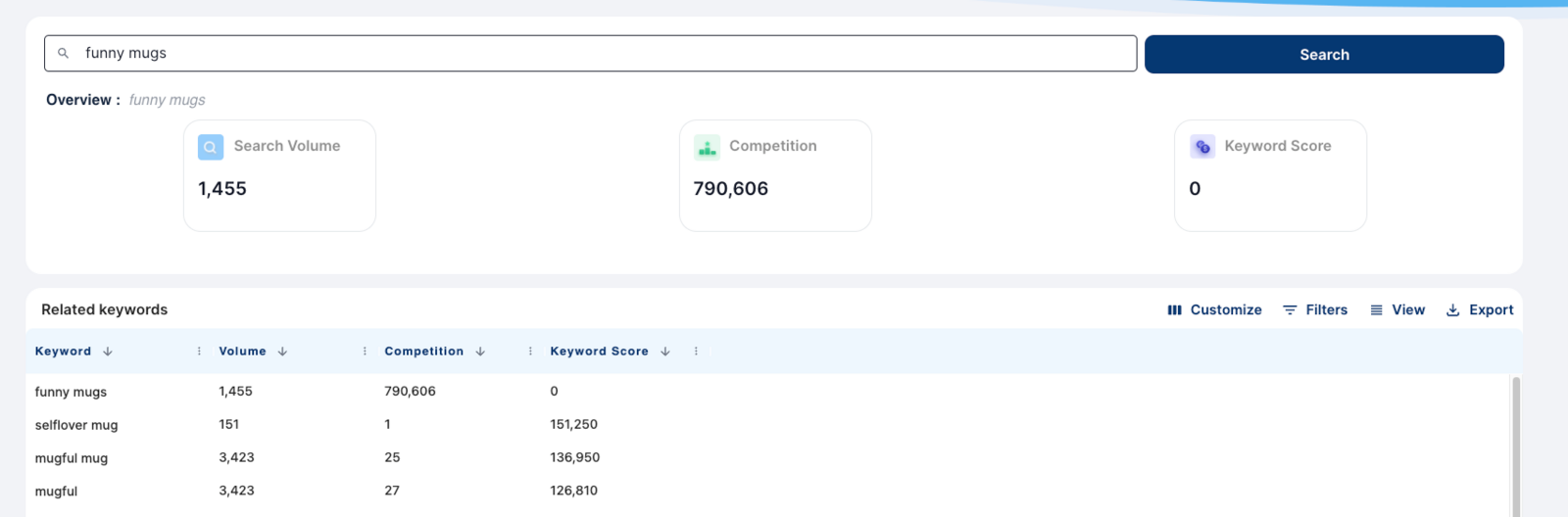
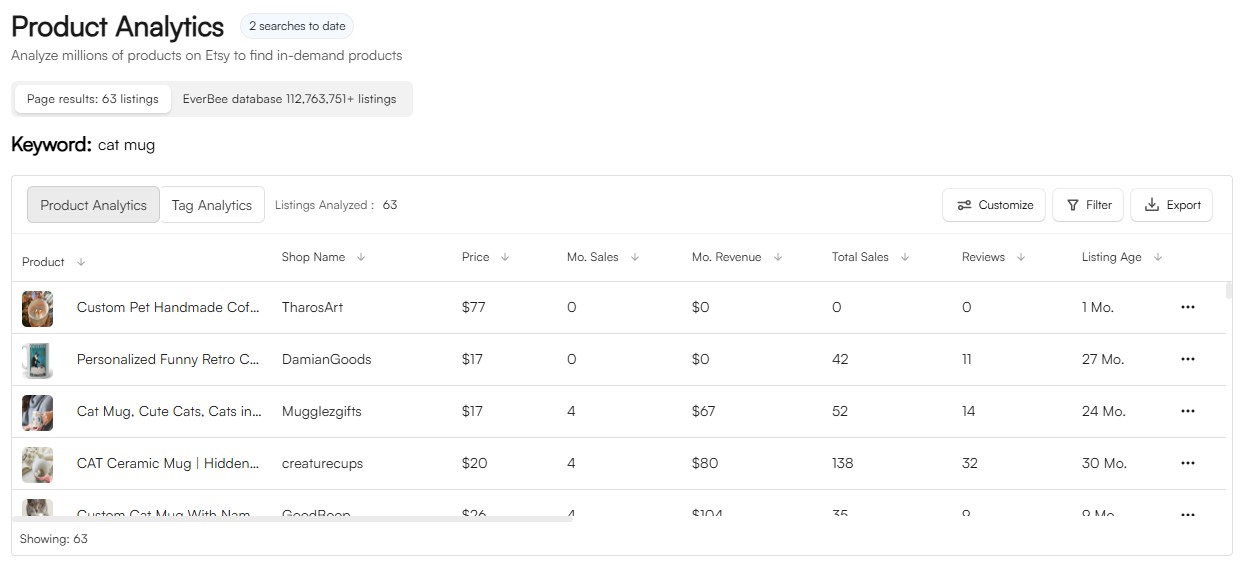
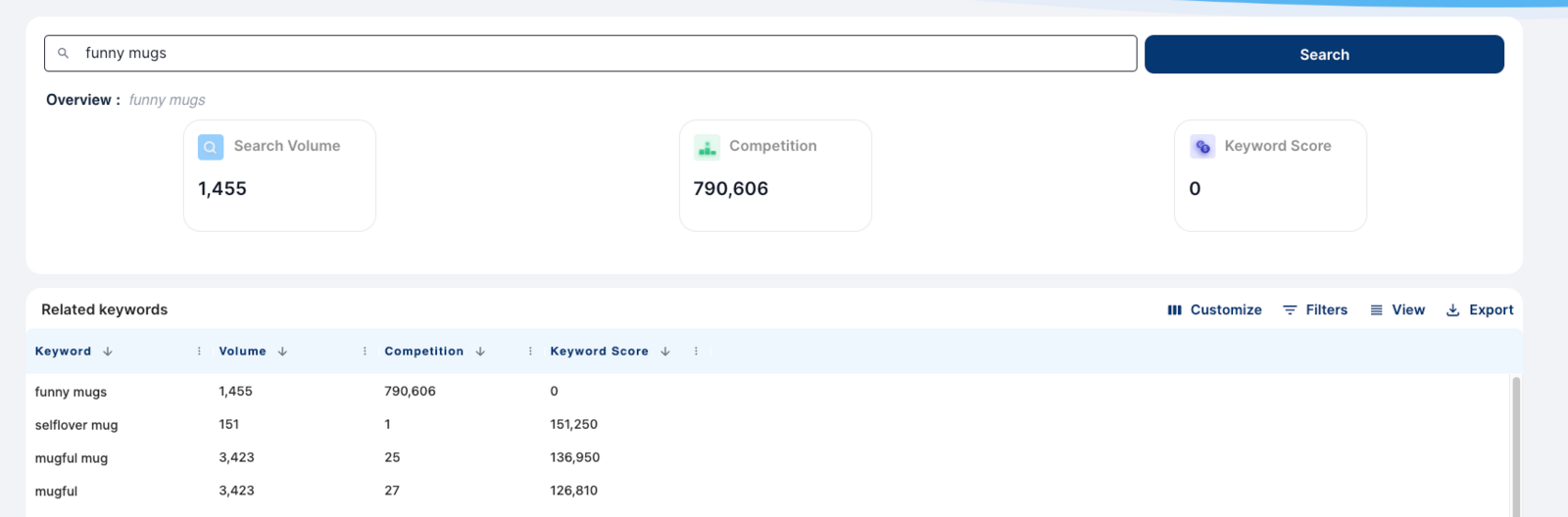
Image: EverBee Keyword Research (from SellerImageAI’s EverBee review assets). The live UI may look different as EverBee updates it.
How EverBee calculates Keyword Score
The table above is EverBee’s definition of the three metrics. The Help Center Keyword Score article gives the formula behind the third column:
Keyword Score = Search Volume ÷ Competing listings × 1000
The ×1000 just makes the ratio readable. What matters is demand per competing listing. A higher score means more searches per competing listing.
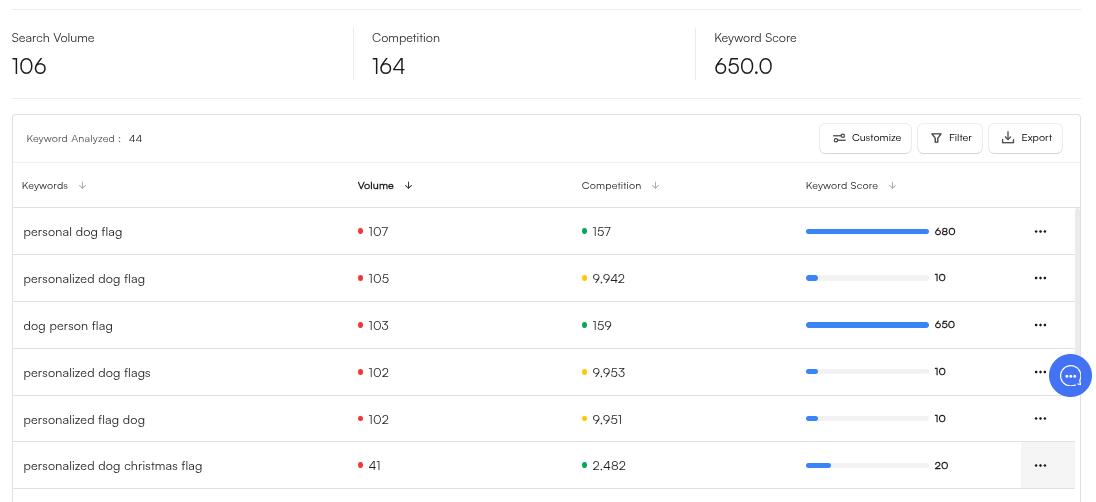
Image: EverBee (
Help Center: Keyword Score
). Figures are EverBee’s example data.
A worked example (hypothetical numbers)
To show how the formula behaves, here are three made-up keywords. These are not real EverBee data:
| Keyword (hypothetical) | Search volume | Competing listings | Keyword Score |
|---|---|---|---|
| A: broad phrase | 20,000 | 1,000,000 | 20 |
| B: specific long-tail | 900 | 9,000 | 100 |
| C: obscure phrase | 30 | 100 | 300 |
Keyword C has the highest score, but only 30 searches. Very few shoppers will look for it. Keyword B is usually the sweet spot: real demand and far less competition than A. The highest score can have tiny volume, so the score should never be read on its own.
Before you start: Hobby has 10 searches, so plan them
On Hobby, the pricing page lists 10 keyword searches and 5 saved keywords. That’s enough to test the workflow on one product idea, not enough for a whole shop.
Two ways to make 10 searches go further:
- Do your brainstorming outside EverBee first. Write your seed list (step 1 below) on paper or in a spreadsheet, so each EverBee search tests a real candidate.
- Use Etsy’s search bar for free variations. Etsy’s autocomplete suggestions cost nothing. The EverBee extension can also show estimated search volume next to Etsy’s suggestions while you browse, as described on EverBee’s keyword research page.
If you find yourself out of searches after the first idea, that’s the point where the Growth plan’s unlimited searches start to matter. Our Hobby vs Growth guide covers the full list of differences.
Start EverBee’s free Hobby plan (no credit card) →
Step 1: Build a seed list that describes your product
EverBee’s own keyword guide suggests writing down words that describe your product before you search. Its categories are a good template:
| Seed type | EverBee’s examples | Your notes |
|---|---|---|
| Adjectives | soft, sturdy, vegan, natural | Materials, finish, feel |
| Demographics | toys for kids, teens, 13-year-old | Who it’s for |
| Synonyms | nail paint vs nail polish | Different words buyers use |
| Occasions | first anniversary, stocking stuffers, bachelorette party | When people buy it |
| Style | art deco lamp, minimalist ring, rustic wall decor | Look and aesthetic |
Then combine them into phrases a shopper might type. EverBee’s example is a 13th birthday gift: “13th birthday”, “teenager gift”, “girl 13th birthday” and so on.
Step 2: Search the combinations in Keyword Research
Open Keyword Research from the web app or the extension and search your best combinations. Each search returns the phrase plus related suggestions with their own volume, competition and, on paid plans, Keyword Score. Comparing scores is most useful inside that one results table.
What to look for, based on EverBee’s guidance:
- Medium or high search volume. Phrases nobody searches won’t bring traffic, however easy they are.
- Relevance. EverBee lists “relevant to the product” as a basic requirement. A popular phrase that doesn’t match your item wastes a tag.
- Lower competition. EverBee’s competition article uses “handmade jewellery” as an example of a crowded term, compared with more specific phrases like “unique gemstone necklaces.”
- Long-tail phrases. EverBee recommends specific phrases such as “canvas tote bag” over generic ones like “tote bag,” because shoppers using specific searches are usually closer to buying.
Step 3: Split your results into two groups
EverBee’s guide suggests separating results into two segments:
- High search volume phrases (generic and long-tail)
- High Keyword Score phrases (generic and long-tail)
Why two groups? High-volume terms describe the main thing you sell and help Etsy understand the listing. High-score terms are the less crowded phrases where a new shop has a better chance of being seen. A good listing usually uses some of each.
On Hobby you won’t see Keyword Score, so sort by volume and compare competition yourself. A rough version is “searches per competing listing,” which is the same idea as the formula above. A very small or very broad term can still mislead you; see the worked example and Why Keyword Score can mislead you.
What is a good EverBee Keyword Score?
EverBee doesn’t give a cut-off. Its Help Center says, “There is no single number to go by when determining a ‘good’ keyword score.” Here’s a practical way to use the score instead:
- Filter by relevance first. Only consider phrases that describe your product accurately. A high score for an unrelated keyword is useless.
- Set a minimum search volume that makes sense for your niche, so you don’t chase phrases nobody searches for.
- Then compare Keyword Scores within that shortlist. The higher-scoring phrases offer more demand per competing listing. They make good candidates for your title and tags.
- Mix broad and specific terms. Combining a few broader phrases with specific long-tails across your title and tags is a common approach.
Treat the score as a ranking tool within one search, not as a pass/fail grade. A score that looks “low” in a huge category might still be one of the best options there.
Step 4: Check what top competitors are tagging
EverBee recommends studying competitor keywords to understand why some listings outrank others. Tag Analyzer shows the tags on a competitor’s listings. EverBee’s Welcome guide describes it as a way to “analyze all the tags/keywords your competitor uses.” Treat those phrases as ideas to test in Keyword Research, not as a list to copy. Plan limits and the full walkthrough are in EverBee Tag Analyzer: what it shows and when to use it.
Step 5: Export a master keyword list
EverBee’s Help Center says you can export a keyword search together with its suggested related keywords, “up to 2k keywords and insights with just one click.” Do this for your best two or three searches and combine the files into one spreadsheet.
A simple master-list layout:
| Phrase | Volume | Competition | Score (paid) | Relevant? | Use in |
|---|---|---|---|---|---|
| your phrase | from export | from export | from export | yes / no | title / tag / skip |
Delete anything that isn’t truly relevant first. Then mark which phrases go in the title and which go in tags.
Step 6: Turn the list into titles and tags
This step follows Etsy’s rules, not EverBee’s. According to Etsy Help:
- You can use up to 13 tags per listing.
- Each tag can be up to 20 characters.
- A tag can be a short phrase, such as “silver earrings” or “minimalist jewelry.”
Etsy’s Keywords 101 handbook recommends using all 13 tags, using multi-word phrases and adding variety rather than repeating the same words. When a long-tail phrase is longer than 20 characters, Etsy suggests breaking it into shorter phrases that still cover the search.
A practical split from your master list:
- Title: the clearest high-volume phrase that describes the item, plus one or two specific details.
- Tags: a mix of high-score long-tail phrases, occasion phrases and buyer-intent phrases from Step 1.
For the characters a tag may include, and for the listing title length limits, see how many tags on Etsy and the Etsy title character limit.
Step 7: Re-check after you list
Keyword research isn’t a one-time job. After your listing has been live for a while:
- Check which search terms actually bring visits in your Etsy shop stats.
- Re-search your main phrases in EverBee to see if competition has changed. On paid plans, check trend direction before seasonal peaks.
- If you have Shop Manager access, compare your top EverBee picks with Etsy’s Marketplace Insights (Shop Manager → Stats → Marketplace Insights). Etsy says it gives “direct access to real Etsy search data,” including the number of searches and listings for a term over the last 30 days. Standard sellers get 15 keyword searches per week. You can compute your own searches-per-listing ratio from those numbers, the same idea as Keyword Score. Etsy also says the tool helps you find “areas of opportunity with high buyer interest but a lower number of listings.”
Selling outside the US? Filter by country
EverBee’s market research by country article describes three ways to research a specific market:
- Filter Product Analytics and Shop Analyzer tables by country.
- Filter the Etsy page by shop location and shipping location; EverBee analyzes the same data Etsy shows.
- Change the Etsy market at the bottom of the Etsy page.
EverBee also notes that it displays listing titles and tags in whatever language the listing uses. If you target German buyers, expect German-language tags in your competitor research.
Why Keyword Score can mislead you
Search volume is an estimate (see beginner mistake 2). These other limits still apply when you compare phrases inside one search:
- Competition counts listings, not quality. 5,000 weak listings and 5,000 strong ones look the same in the formula.
- Etsy search is personalized. Etsy’s Help Center says search results are “unique to who is searching,” so ranking isn’t just about keywords.
- Keywords don’t sell products on their own. Etsy says its search also looks at how shoppers engage with listings: clicks, favorites and purchases (Seller Handbook). Good photos and fair prices still matter.
Common beginner mistakes
- Chasing volume alone. A huge generic term like “tote bag” is a hard place for a new listing to be seen. EverBee itself recommends long-tail phrases.
- Treating the numbers as exact. On its keyword research page, EverBee says its sales-estimate algorithm averages about 80% accuracy, which also means it can be off. Etsy doesn’t share raw sales or search data with third-party tools, so the search volume behind Keyword Score is modeled. eRank, for example, says it relies on third-party data companies for its search estimates. Different tools often show very different volumes for the same phrase. Use the numbers to compare phrases, not as guarantees.
- Copying competitor tags. Tags are clues for your own research, not a template.
- Using up Hobby searches on brainstorming. Do the thinking first, then use EverBee to check candidates.
- Forgetting relevance. Etsy matches searches to what your listing actually is. Irrelevant keywords bring the wrong shoppers.
Using Keyword Score with Claude (EverBee Research MCP)
EverBee offers a Research MCP connector for Claude. According to its Help Center, once it’s connected, Claude can pull “search volume, competition, and keyword scores” from EverBee. You can ask in plain English, for example: “What’s the search volume and competition for ‘personalized dog tag’?”
Key facts from EverBee’s documentation:
- Plans: available on Growth and Business only.
- Setup: add a custom connector in Claude (Settings → Connectors) using EverBee’s MCP server URL, then approve access in EverBee.
- Permissions: Claude can view shops, listings and keywords, and view, create or update your Favorites and folders. You approve these during setup.
- Same data: EverBee says it’s the same research engine used in the app, so the same caveats about estimates apply.
This is handy for quickly shortlisting keywords. Still check the raw volumes yourself before you finalize tags.
Try EverBee Keyword Research free →
FAQ
Is EverBee keyword research free?
Partly. The free Hobby plan includes 10 keyword searches and does not include Keyword Score, according to EverBee’s pricing page (checked October 14, 2026). Unlimited searches and Keyword Score are on Growth and Business. See the official pricing page for current pricing.
Where is the keyword tool in EverBee?
EverBee says Keyword Research is available in both the EverBee web app and the Chrome extension. The extension can also show estimated search volume while you browse Etsy on desktop.
What does keyword competition mean in EverBee?
It’s the number of competing listings for that keyword. Higher competition means more listings are trying to rank for the same phrase.
How many keywords can I export from EverBee?
EverBee’s Help Center says one export can include up to 2,000 keywords and insights for a search and its related suggestions.
Can I do EverBee keyword research without an Etsy shop?
Yes. EverBee says you only need an Etsy account (buyer or seller) connected to EverBee, so you can research keywords before opening a shop.
Is EverBee better than eRank for keyword research?
They take different approaches. EverBee pairs keywords with sales estimates; eRank is more focused on SEO tools. See our EverBee vs eRank comparison for a side-by-side view. Marmalead is a listing-SEO tool with keyword forecasts and letter grades; EverBee vs Marmalead compares that approach with EverBee’s research workflow.
What does Keyword Score mean on EverBee?
It is search volume divided by the number of competing listings, multiplied by 1,000. A higher score means more searches per competing listing. The formula and the made-up example are in How EverBee calculates Keyword Score. For what counts as a good score, see What is a good EverBee Keyword Score?.
Why does a keyword have a high score but no sales?
A high score can come from very low search volume, or from searches that don’t lead to purchases. Check volume and relevance. Photos, price and reviews affect sales too.
Is EverBee’s search volume accurate?
It’s an estimate. Etsy’s own Marketplace Insights is the most direct source of Etsy search data, though it needs Shop Manager access and limits standard sellers to 15 searches per week.
Can I see EverBee keyword data in Claude?
Yes, with EverBee’s Research MCP on the Growth or Business plan. Claude can pull the same search volume, competition and keyword scores, with the same estimate caveats. Setup is in Using Keyword Score with Claude (EverBee Research MCP).
Related guides
- EverBee Tag Analyzer: what it shows and when to use it
- EverBee Review 2026: pricing, free plan and accuracy
- How to see Etsy sales of other sellers
- EverBee Hobby vs Growth: free plan limits
- EverBee vs eRank for beginners
- EverBee vs Marmalead: product research vs listing SEO
- EverBee vs Sale Samurai: pricing, free plans and keyword tools
Last updated: October 27, 2026. Prices and plan limits cited from EverBee’s pricing page on October 14, 2026.