· ming · Guides · 7 min read
Etsy Shop Banner Size 2026: Pixels and Ratio
Big banner minimum 1200×300 px, recommended 1600×400. Mini banner minimum 1200×160 px, recommended 1600×213. Ratios and which file to export.
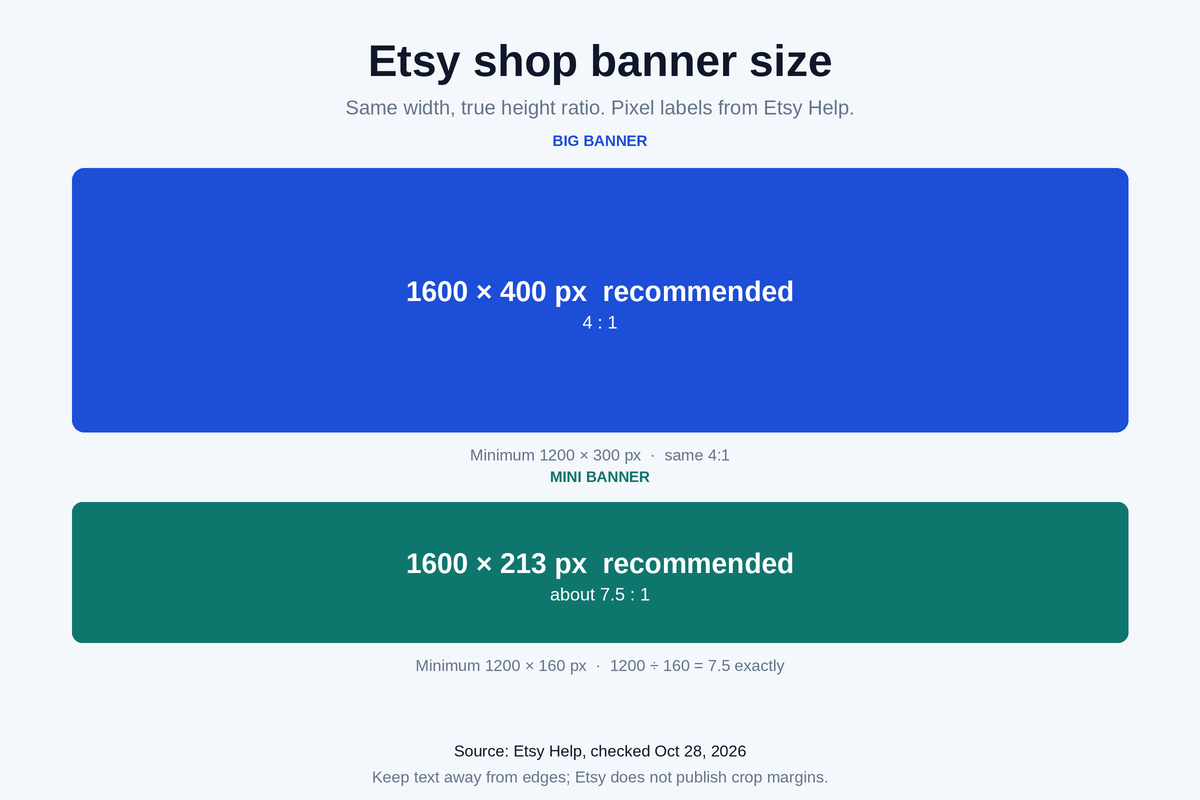
For a big Etsy shop banner, the minimum is 1200 × 300 pixels and 1600 × 400 is recommended, as of October 28, 2026. A mini banner minimum is 1200 × 160 pixels, and the recommended size is 1600 × 213. Both big-banner pairs are 4:1. Both mini-banner pairs are about 7.5:1. Listing photos follow a different spec, covered in the Etsy listing photo size guide.
Compiled from Etsy Help pages checked October 28, 2026; we did not upload test listings.
Banner sizes on each Etsy page
Etsy lists banner pixels on more than one page. The image requirements page holds the minimum and the recommended size. The shop appearance page repeats the two minimums. Carousel and collage minimums are on the Etsy Plus page. Ratios below are width divided by height. Etsy does not publish a ratio of its own.
Checked Oct 28, 2026.
| Banner | Help minimum | Help recommended | Computed ratio | Export | Source |
|---|---|---|---|---|---|
| Mini shop banner | 1200 × 160 px | 1600 × 213 px | 7.5:1 | 1600 × 213 px | Image requirements; Shop appearance |
| Big shop banner | 1200 × 300 px | 1600 × 400 px | 4:1 | 1600 × 400 px | Image requirements; Shop appearance |
| Carousel, each of up to 4 | 1200 × 300 px | 1200 × 300 px | 4:1 | 1200 × 300 px | Etsy Plus; Image requirements |
| Collage, 2 images | 600 × 300 px | 600 × 300 px minimum | 2:1 | At least 600 × 300 px | Etsy Plus; Image requirements |
| Collage, 3 images | 400 × 300 px | 400 × 300 px minimum | 4:3 | At least 400 × 300 px | Etsy Plus; image requirements |
| Collage, 4 images | 300 × 300 px | 300 × 300 px minimum | 1:1 | At least 300 × 300 px | Etsy Plus; image requirements |
| Order receipt banner | 760 × 100 px | Not stated | 7.6:1 | At least 760 × 100 px | Image requirements |
The appearance page repeats the two floors: mini 1200 × 160 pixels, big 1200 × 300 pixels. Recommended sizes stay on the image page.
For a collage, the image page says the size recommendation depends on the image count, then gives 600 × 300, 400 × 300, and 300 × 300 as the minimum required size. The Plus page uses the same three minimums.
Ratios for the big and mini banners
Big banner, two official pairs:
- 1600 × 400: 1600 ÷ 400 = 4, so 4:1.
- 1200 × 300: 1200 ÷ 300 = 4, so 4:1.
Mini banner:
- 1200 × 160: 1200 ÷ 160 = 7.5, so 7.5:1.
- 1600 × 213: 1600 ÷ 213 = 7.51 to two decimals (the full value is 7.5117…). An exact 7.5:1 height at 1600 pixels wide is 1600 ÷ 7.5 = 213.33 pixels. Etsy’s recommended height is 213, so this pair is about 7.5:1.
Collage tiles use other shapes from the same division: 600 × 300 is 2:1, 400 × 300 is 4:3, and 300 × 300 is 1:1.
For a big banner, export 1600 × 400, the size the image page calls recommended. It is 4:1, like the 1200 × 300 minimum. The image page says increasing the size of an image may lose resolution and pixelation may occur, so start from a design at least that large.
For a mini banner, export 1600 × 213. The floor is 1200 × 160.
A banner sits with the shop’s other brand graphics. The Renderforest review of logos, mockups, and promo videos covers those tools for Shopify, Etsy, and POD brand assets.
Inches, once you pick a PPI
Etsy lists banner sizes in pixels only; inches depend on the PPI your design app uses.
1600 × 400 at two common PPI settings:
| PPI you set | Width | Height | Source |
|---|---|---|---|
| 72 | 1600 ÷ 72 = 22.22 in | 400 ÷ 72 = 5.56 in | Image requirements, 1600 × 400 px |
| 300 | 1600 ÷ 300 = 5.33 in | 400 ÷ 300 = 1.33 in | Same page |
Rounded to two decimals from 22.222…, 5.555…, 5.333…, and 1.333…. Both rows are the same 1600 × 400 pixels. Read the pixel width and height before export. The 22.22 by 5.56 inch box is that banner on the 72 PPI row. The 300 PPI row is 5.33 by 1.33 inches.
Carousel and collage sizes on Etsy Plus
Every seller can set a mini or big banner. Carousel and collage are Etsy Plus layouts. The image page says both are for sellers subscribed to Etsy Plus.
A carousel holds up to 4 images that shoppers scroll through. Each image must be at least 1200 × 300 px. You can link a carousel image to a specific listing or a shop section. The image page’s recommended size for that image is the same 1200 × 300 px.
A collage uses 2, 3, or 4 images at the 600 × 300, 400 × 300, or 300 × 300 minimums. When a tile is a product mockup, the Dynamic Mockups review for bulk POD and Etsy mockups covers that job.
If you cancel Etsy Plus, any shop customization you’ve added that’s available only under Etsy Plus will be removed at the end of your subscription cycle. Your shop banner and featured items will default to standard options. Images uploaded for advanced shop customization will not be saved if you cancel and subscribe again later. That wording is on the Plus page, checked October 28, 2026.
On that page the edit path is Shop Manager, Sales channels, the pencil icon next to the shop, the plus symbol next to Banner, a layout, Add an image, then Save. A crosshair repositions an image when you drag it. Keep text away from the edges; Etsy does not publish crop margins.
Shop Manager path, and what None changes
For a mini or big banner, the appearance page path is short. On Etsy.com, go to Shop Manager. Select the pencil icon next to your shop name under Sales Channels. Select Banner. Choose the banner type. Select Done.
To leave the banner off, select None. The page says this will move your listings higher up on the page, and your logo will be the most prominent branding on your shop homepage.
The same image page recommends a 500 × 500 px logo and a 400 × 400 px profile photo. Those are separate files from the banner.
Upload limits that apply to the banner file
The image page says every shop image should be .jpg, .gif, .png, .svg, or .heic. Animated GIF files are not supported. On a PNG with transparency, the transparent parts appear black.
Images larger than 1MB in file size may not finish uploading, especially on a slower internet connection. Images may appear less sharp after upload because Etsy compresses the files.
As of October 28, 2026, export 1600 × 400 for a big banner and 1600 × 213 for a mini banner.
FAQ
Why does a design app show the banner in inches?
The app converts pixels with the PPI saved in the document. Etsy’s banner pages publish pixel sizes, with no inch size and no PPI. At 72 PPI, 1600 × 400 is about 22.22 by 5.56 inches, and at 300 PPI it is about 5.33 by 1.33 inches. Trust the pixel readout: 1600 × 400 is the recommended big banner, and that inch box is the 72 PPI row.
Can carousel images be reordered after upload?
Upload them in the order you want them to appear. The Plus page says it is not possible to click and drag to reorganize the images. Each image still needs a minimum of 1200 × 300 pixels, and a link can point to a listing or a shop section. A description on that link sits at the bottom right of the image; the trash can removes an image, and Change layout switches the banner type.
Does the mini banner show on mobile?
Etsy’s shop appearance page says shop banners appear on the standard website and on mobile devices. It does not say how each banner type displays on a phone, so preview your shop in the Etsy app after upload.
How do you reposition one image inside a carousel or collage?
The Etsy Plus page shows a crosshair in the top right after you choose a layout and add images, when that control applies. Select the crosshair, then click and drag to reposition that image. Upload time for those images varies with how many you add, their size and resolution, and your internet speed.