· ming · Guides · 10 min read
EverBee Shop Analyzer: How to Study a Competitor Etsy Shop
What EverBee Shop Analyzer shows for a competitor's Etsy shop, how to open it from the dashboard or Chrome extension, which columns are paid-only, the 64-listings-per-page limit, and a step-by-step way to turn one shop into product and tag ideas without copying.
Affiliate disclosure: This guide contains affiliate links to EverBee. If you sign up for a paid plan through them, SellerImageAI may earn a commission at no extra cost to you.
EverBee’s Shop Analyzer answers one question: what is this specific Etsy competitor selling, and how well does it seem to be doing? Product Analytics starts from a keyword. Shop Analyzer starts from a shop name.
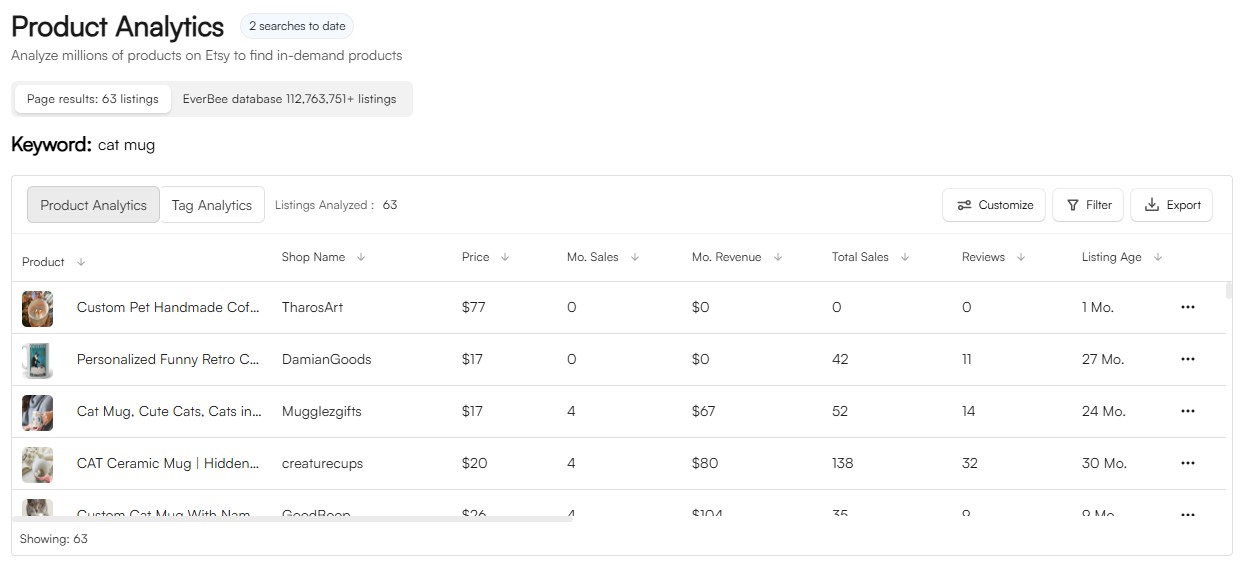
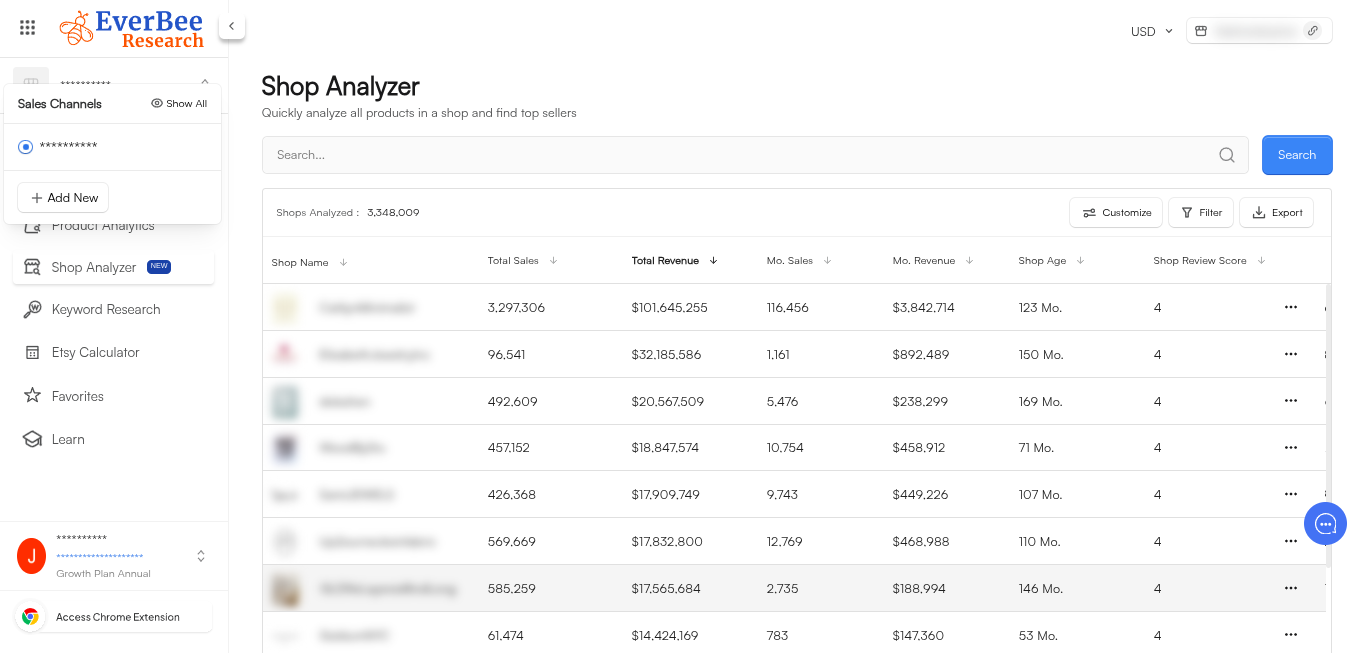
This guide is based on EverBee’s Help Center articles on Shop Analyzer, analyzing all listings of a keyword or store, Product Analytics and advanced filters, plus the live pricing page, all checked October 17, 2026. We have not run a hands-on Shop Analyzer test for this article. The header image is the official Shop Analyzer screenshot from EverBee’s Shop Analyzer help article (shop names blurred by EverBee); it shows columns for total sales, total revenue, monthly sales, monthly revenue, shop age and shop review score. The other screenshot on this page is an official EverBee image of a different tool.
Quick answer
- What it is: EverBee says Shop Analyzer lets you view a competitor’s Etsy sales data, “including sales revenue, tags, and other valuable insights” (Shop Analyzer).
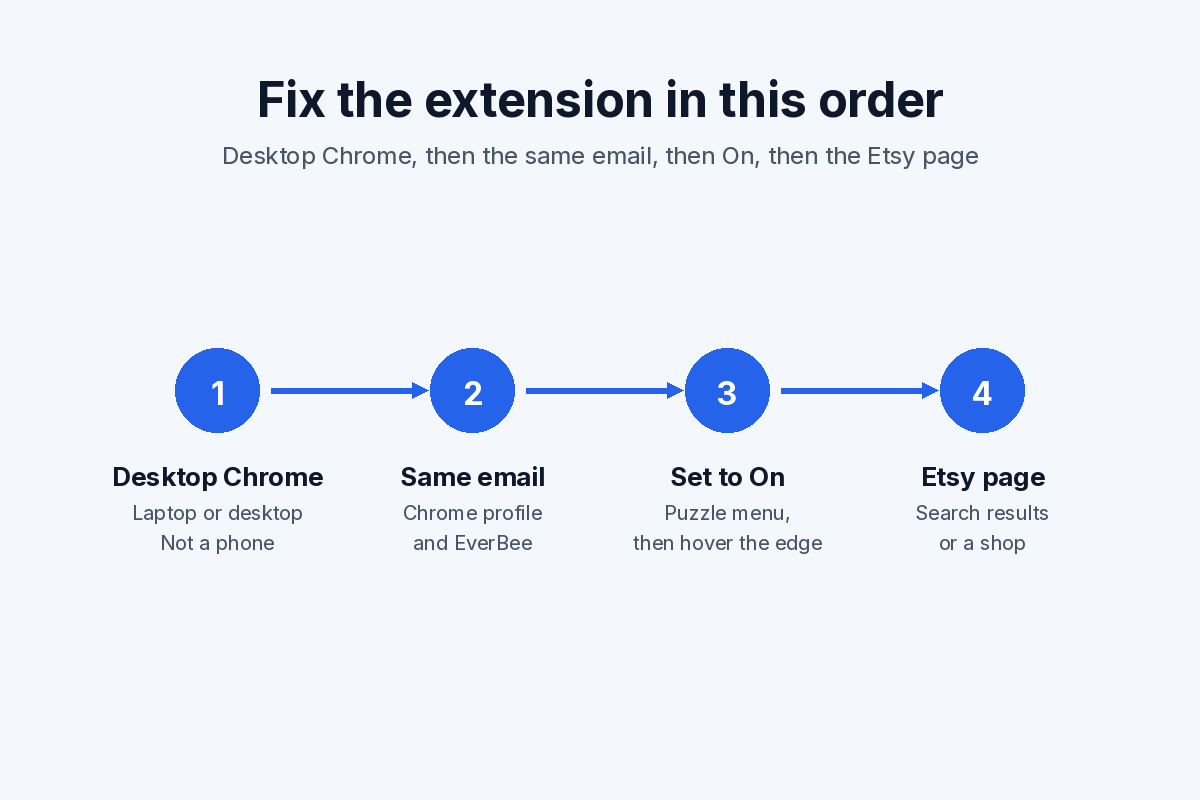
- Where to open it: in the EverBee web app (sidebar → Shop Analyzer → search the shop) or from the EverBee Chrome extension on Etsy. EverBee says it is now separate from Product Analytics.
- How much it covers: on the dashboard, EverBee says it displays all listings of the shop you analyze. In the extension, it analyzes the listings on the Etsy page you are viewing, usually 64 per page, so you repeat it page by page.
- Free vs paid: the pricing page doesn’t list Shop Analyzer as its own line. It does say Hobby’s Product Analytics shows views, reviews and favorites, while sales, revenue and conversion rate are on Growth and Business. Plan on needing a paid plan for shop-level sales and revenue estimates, and check your own account.
- Best use: studying one or two direct competitors you have already identified, not finding a niche from scratch.
Open EverBee (affiliate link) →
What Shop Analyzer is for
EverBee gives three reasons to track a competitor shop (Shop Analyzer):
- Spot market gaps. See which products in a shop do well and which product types are missing.
- Adjust pricing. EverBee’s example is finding underpriced items in a competitor’s shop and offering your own version at a competitive price that still leaves profit.
- Find tag ideas. If a competitor uses tags you don’t, EverBee suggests using them “as inspiration” for your own listings.
In EverBee’s top-selling products guide, Shop Analyzer comes in after keyword research: once Product Analytics turns up a direct competitor, Shop Analyzer gives “a better understanding of their listings.”
What you see for a shop
EverBee’s help article on Shop Analyzer is short and doesn’t list every column. Because the shop view shows the shop’s listings in EverBee’s analytics table, the Product Analytics article is the best public reference for what each number means:
| Column | What EverBee says it means | Plan note |
|---|---|---|
| Price | Estimated price of the listing | Shown broadly |
| Monthly Sales | Approximate units per month, calculated as total sales ÷ listing age | Growth / Business |
| Monthly Revenue | Approximate revenue per month across variants, calculated as price × monthly sales | Growth / Business |
| Total Sales | Estimated units sold since the listing was created | Growth / Business |
| Reviews | Total customer reviews for the listing | Hobby includes reviews |
| Listing Age | Months since the listing was published | — |
| Visibility Score | Compares a listing’s daily views with others on Etsy | — |
| Conversion Rate | Total sales ÷ total views | Growth / Business |
The plan notes come from two public statements. The pricing page lists Hobby Product Analytics as “views, reviews, favorites” and Growth/Business as “sales, revenue, conversion rate.” The Product Analytics article says “all the premium tools on this feature are only available for the Growth and Business Plan.” Column names and placement can change, so check them in your own account.
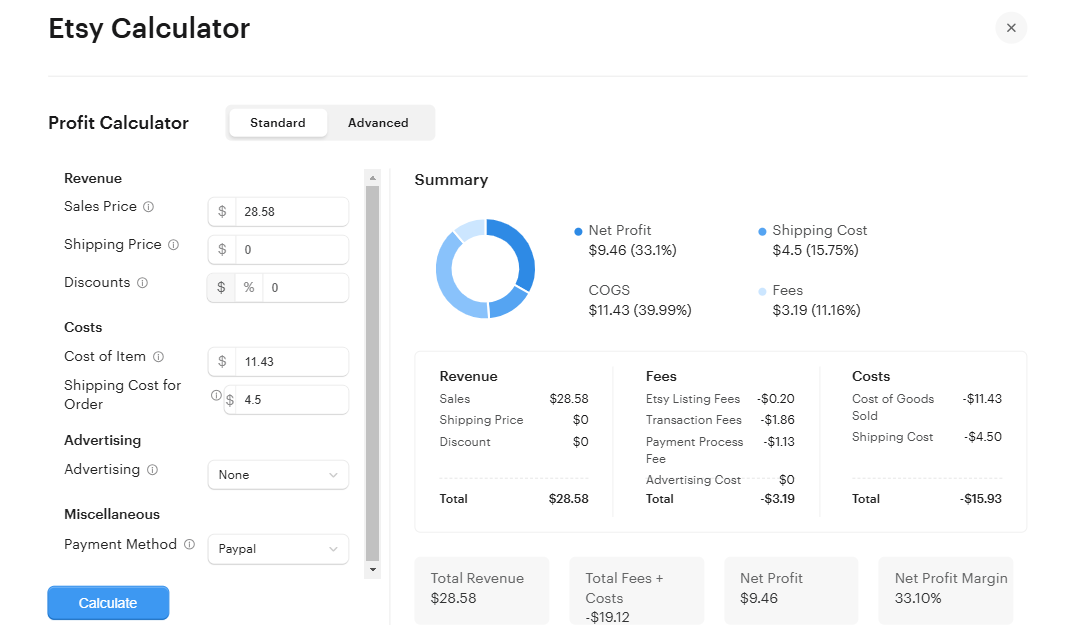
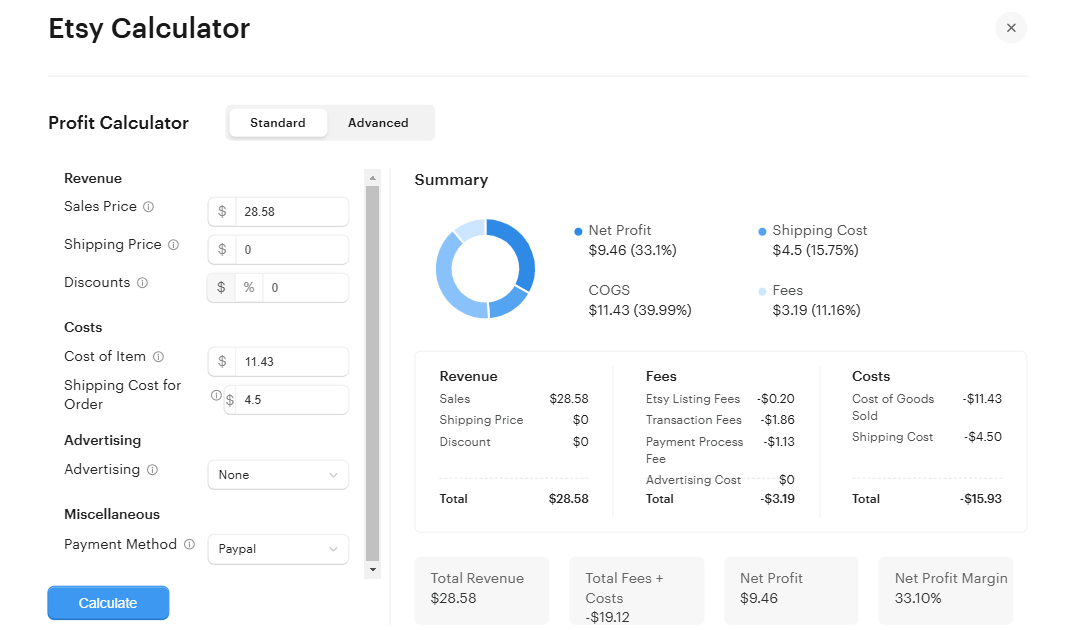
Image: EverBee’s Etsy profit calculator (official EverBee screenshot), useful once you have a competitor’s price in hand (see our EverBee Etsy Fee Calculator guide). It is not the Shop Analyzer table; check the live UI for current Shop Analyzer columns.
Remember these are estimates
Every sales and revenue figure is modeled from public signals. EverBee doesn’t have Etsy’s private order data. Monthly revenue is price multiplied by monthly sales, and monthly sales is total sales divided by listing age, so revenue is an estimate built on another estimate. A listing that sold heavily once and then slowed down can still show a healthy monthly average. Your own shop’s real numbers live in Etsy’s free Stats page instead; see EverBee vs Etsy’s free Shop Stats for what each one shows. For a full explanation of how far to trust these numbers, see how to see Etsy sales of other sellers.
How to open Shop Analyzer
From the EverBee dashboard (per EverBee’s help article):
- Go to your EverBee dashboard.
- Click Shop Analyzer in the sidebar.
- Search for the shop.
- EverBee displays the shop’s listings in its analytics table.
From the Chrome extension: EverBee says you can also run Shop Analyzer from the extension on Etsy’s search page. On Etsy, the extension analyzes the listings shown on the current page, which EverBee says is usually 64 listings, and you repeat the analysis on each page. If a shop has fewer listings, the number is lower. Our EverBee Chrome extension guide covers setup and the Hobby limits inside the extension.
Tip: if you plan to analyze a large shop, use the dashboard route. The extension’s page-by-page limit makes big shops slow to review.
A step-by-step way to analyze one competitor shop
The steps below are our own workflow, built from EverBee’s documented features. They are not EverBee instructions and not a tested result.
- Choose the right shop. Pick a shop that sells close to what you plan to sell, at a similar price point. A giant shop in a related niche teaches you less than a mid-sized direct competitor.
- Sort by Monthly Sales or Monthly Revenue. This shows which listings look like the shop’s main earners. Expect a handful of listings to account for most of the estimated revenue.
- Filter by Listing Age. EverBee’s filters article suggests combining Listing Age with sales to find young listings that already sell. In a shop view, this separates new winners from old listings with years of reviews behind them.
- Check Reviews and Conversion Rate together. A listing with a high conversion rate but few reviews may be a newer product worth watching. Many reviews but low recent sales may mean a fading product.
- Note price ranges. Write down the price band of the shop’s best sellers. Compare it with your own costs. EverBee’s own example is spotting underpriced items, but a lower price only works if your margin survives Etsy fees.
- Move promising listings into Tag Analyzer. Shop Analyzer tells you what sells. Tag Analyzer (Growth and Business per pricing) tells you how those listings are described. EverBee’s tag guide suggests running Shop Analyzer first, then Tag Analyzer.
- Validate the language in Keyword Research. Run competitor phrases through EverBee Keyword Research and check Keyword Score before you use them. A phrase that works for an established shop may be too crowded for a new one.
- Export if you want a record. EverBee says you can export analytics tables to CSV; the Product Analytics article says the file is emailed to your account address, and the filters article notes some exports cover only the current Etsy page.
Try EverBee Shop Analyzer (affiliate link) →
Shop Analyzer vs Product Analytics vs Tag Analyzer
| Tool | You start with | Best for |
|---|---|---|
| Product Analytics | A keyword or Etsy search | Finding which listings in a niche seem to sell |
| Shop Analyzer | A shop name | Seeing all of one competitor’s listings and their estimated performance |
| Tag Analyzer | Shortlisted listings or shops | Seeing the tags competitors use |
A practical order, with the niche search written out in how to find best-selling items on Etsy with EverBee: Product Analytics to find a niche and a few direct competitors → Shop Analyzer on one or two of those shops → Tag Analyzer on their best listings → Keyword Research to validate.
Hobby vs Growth for shop research
On EverBee’s pricing page (checked October 17, 2026):
| Plan | Product Analytics columns | Saved shops (Favorites) | Price |
|---|---|---|---|
| Hobby (free) | Views, reviews, favorites | 5 shops | Free |
| Growth | Sales, revenue, conversion rate | 100 shops | Paid; check current price on the official pricing page |
| Business | Sales, revenue, conversion rate | Unlimited | Paid |
EverBee’s FAQ says there is no free trial of paid plans; Hobby is the free entry point and needs no credit card. So on Hobby you can still browse a competitor’s listings with reviews and favorites, but the sales and revenue estimates that make Shop Analyzer useful for gap and pricing research are paid. Our Hobby vs Growth guide covers whether the upgrade is worth it, and the EverBee review covers the whole tool.
Common mistakes
- Copying a competitor’s catalog. EverBee’s own tag guide warns against copying keywords exactly. The same applies to products and designs, which may also be protected by copyright or trademark. Use a shop as evidence of demand, not as a template.
- Reading estimates as income. Monthly revenue is a model. Use it to compare listings inside the same shop or niche, not to forecast your own earnings.
- Analyzing the wrong competitor. A shop with ten years of reviews competes on trust you can’t match in month one. Learn more from shops a few steps ahead of you.
- Stopping at page one in the extension. The extension analyzes about 64 listings per page. Use the dashboard for a full shop view.
- Skipping tag and keyword validation. Knowing what sells is half the job. Check how buyers search before you write titles and tags.
If you’re still choosing between research tools, see EverBee vs eRank and EverBee vs Alura.
FAQ
What does EverBee Shop Analyzer do?
It shows a competitor Etsy shop’s listings with EverBee’s estimated sales and revenue data, plus tags and other insights, according to EverBee’s Help Center.
Is EverBee Shop Analyzer free?
The pricing page doesn’t list Shop Analyzer separately. Hobby’s Product Analytics includes views, reviews and favorites, while sales, revenue and conversion rate are on Growth and Business. Expect to need a paid plan for shop sales and revenue estimates, and confirm in your account.
Can EverBee analyze every listing in an Etsy shop?
On the dashboard, EverBee says it displays all listings of the shop you analyze. In the Chrome extension, it analyzes the listings on the current Etsy page (usually 64) and you repeat for each page.
Is Shop Analyzer the same as Product Analytics?
No. EverBee says Shop Analyzer is now separate from Product Analytics. Product Analytics starts from a keyword search; Shop Analyzer starts from a shop.
How accurate are Shop Analyzer sales numbers?
They’re estimates built from public signals, not Etsy’s private data. Use them to compare listings and spot patterns. See how to see Etsy sales of other sellers for details.
Is this a hands-on review?
No. This guide summarizes EverBee’s public Help Center and pricing pages. We haven’t run our own Shop Analyzer test.
Related guides
- EverBee Tag Analyzer: what it shows and when to use it
- How to use EverBee Keyword Research for Etsy
- EverBee Chrome extension guide
- EverBee Hobby vs Growth: free plan limits
- How to see Etsy sales of other sellers
- EverBee Review 2026
Last updated: October 17, 2026. Plan details cited from EverBee’s pricing page on that date.