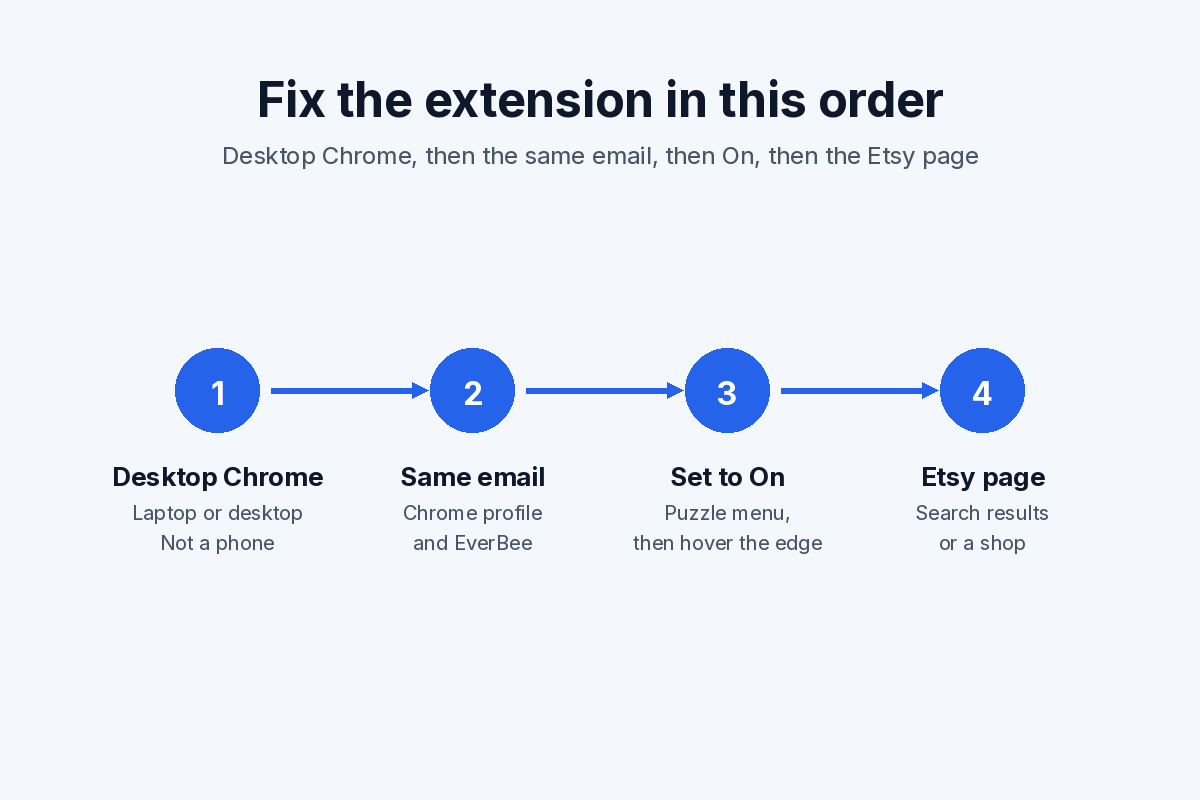
· ming · Guides · 9 min read
How to Find a Niche on Etsy (Free Etsy Data First)
How to find a niche on Etsy: turn an idea into a shopper phrase, check the last 30 days in Marketplace Insights, then read competition with Etsy search and EverBee Product Analytics.
Affiliate disclosure: This guide contains an affiliate link to EverBee. If you sign up for a paid plan through it, SellerImageAI may earn a commission at no extra cost to you. It doesn’t change the steps below.
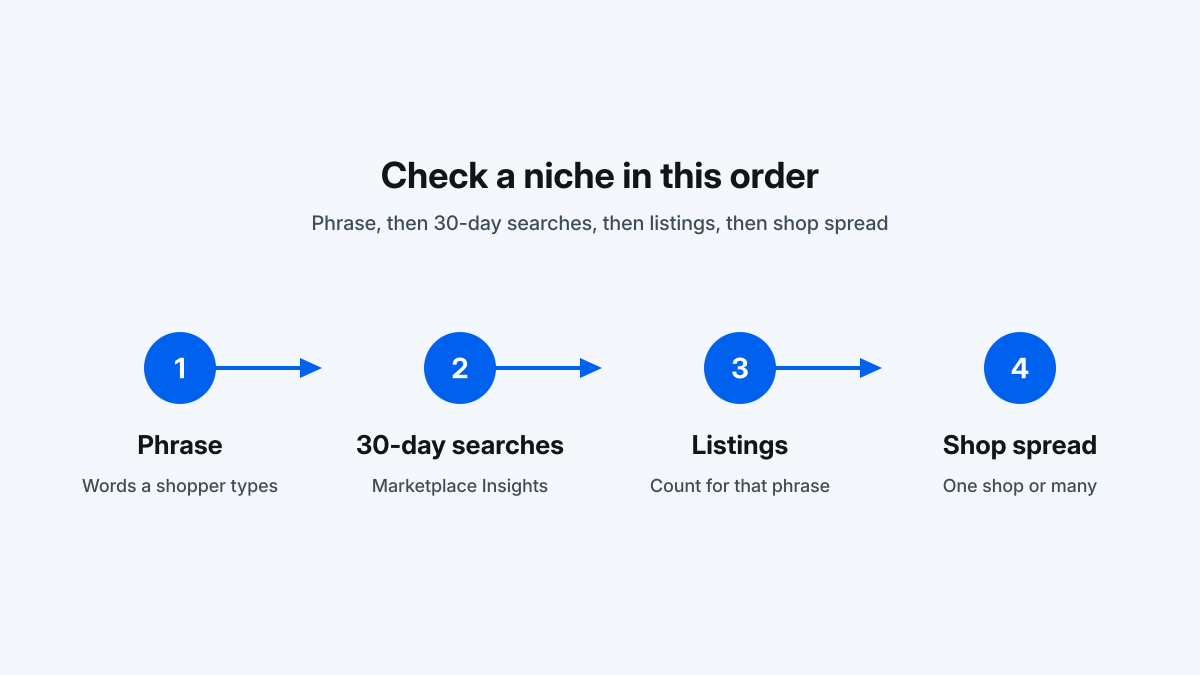
How to find a niche on Etsy means picking one shopper phrase and checking three things before you design a product: whether people searched it, how many listings Etsy ties to it, and whether the listings drawing attention are spread across shops. Etsy’s free Marketplace Insights and the public search page cover the first two. EverBee Product Analytics is one Etsy niche research tool for the third. Its sales figures are estimates.
The steps below come from Etsy Help and from EverBee’s Help Center, pricing page, and annual-offer page, checked on October 25, 2026. We did not run these tools on a live shop for this article. Follow the labels in your own account if a menu has moved.
What you are deciding
A niche here is a phrase a buyer would type, such as “personalized dog bandana,” rather than a category such as “pet supplies.” Etsy niche research at this stage asks whether that phrase is worth making something for.
EverBee’s Find the Top Selling Products for Your Niche starts after that choice. Its example is “dog collar,” then Product Analytics. Sorting that table is covered in how to find best-selling items on Etsy with EverBee. Use it after a phrase passes the checks on this page.
The free Etsy data for a niche
Etsy Help does not document a Shop Manager report named Search Analytics. The free data for this job sits in three places.
| Signal | Where | What Etsy says it shows | Use it to decide |
|---|---|---|---|
| Search bar | Etsy.com and the Etsy app | Suggested phrases, then listings ordered by relevance. You can switch the sort to price, top reviews, or newest. | Which words shoppers are offered, and whether the products on the page match the phrase |
| Marketplace Insights | Shop Manager → Stats → Marketplace Insights | Number of searches and number of listings for a keyword over the last 30 days, plus related terms | Whether the phrase had buyer searches, and which related phrase Etsy associates with fewer listings |
| Shop Stats → Etsy search | Shop Manager → Stats → How shoppers found you → Etsy search | Search terms people used to find your listings | Which of your current phrases already bring visits |
Shop Stats records visits, orders, revenue, and the search terms that already reached your shop. EverBee vs Etsy’s free Shop Stats lines those definitions up against EverBee’s estimates. A new shop can show an empty term list until shoppers arrive from search. Marketplace Insights reports market searches without waiting for your orders.
Step 1: Write the phrase a shopper would type
Etsy’s search help says to enter descriptive terms. The examples on that page are “rustic blue coffee mug” and “custom charm necklace.”
Type a broad word you can make into the Etsy search bar and read the suggestions. Keep the ones that add a buyer, a material, an occasion, or a style.
Open one suggestion and look at the products. Etsy orders results by relevance, and the sort dropdown can show price, top reviews, or newest. Newest shows whether shops are still publishing in the phrase. Do this before you spend a Marketplace Insights search. The wording you keep is the wording you will look up.
Step 2: Check the last 30 days in Marketplace Insights
Etsy’s Marketplace Insights help is the demand check.
Path: on Etsy.com, open Shop Manager, select Stats, select Marketplace Insights, enter the phrase. Etsy says you then see data such as the number of searches and the number of listings on Etsy from the last 30 days.
Limits on the same page, as published there on October 25, 2026:
- 15 keyword searches a week on the free allowance. The number left for the week is shown above the search bar.
- Those free results stay available for 7 days from the time you searched that keyword.
- Etsy Plus subscribers can search unlimited keywords.
- The tool is on desktop and mobile web. The help article does not place it in the Seller app.
Related terms can show buyer interest next to a lower listing count. Etsy does not publish a searches-to-listings ratio that makes a niche acceptable. EverBee’s keyword article says no single search-volume number makes a keyword good either.
Read the 30-day search count and the listing count for the phrase from step 1. If a related term names your object more tightly, save it for the next lookup. If the search page shows a different object, those searches belong to that object.
Etsy’s shop-updates article describes longer date ranges and saved searches as still rolling out. They may be missing from your shop. The steps above use the main help article.
Step 3: Read the search page as a product check
Etsy’s Stats help says search results are unique to who is searching, and that your own listings may not appear when you look them up. The tile count on your screen is your result page. Use the page to see whether the photos match the phrase. Filters include price, handmade or vintage, and Star Seller. A page of supplies when you meant a finished gift is a wording problem.
Set the listing count next to the 30-day search count from Marketplace Insights, which Etsy defines for that window. A crowded parent phrase can still have a related term with fewer listings and buyer interest. Run that related term through step 2.
How to find a niche on Etsy with EverBee Product Analytics
Once Marketplace Insights shows searches for the phrase, Product Analytics compares the listings under it. Monthly sales, monthly revenue, and listing age are defined in how to find best-selling items on Etsy with EverBee.
Read the shop names on the rows. The same shop on many rows means one catalog may be carrying the phrase. Several shops mean the phrase is wider than one store.
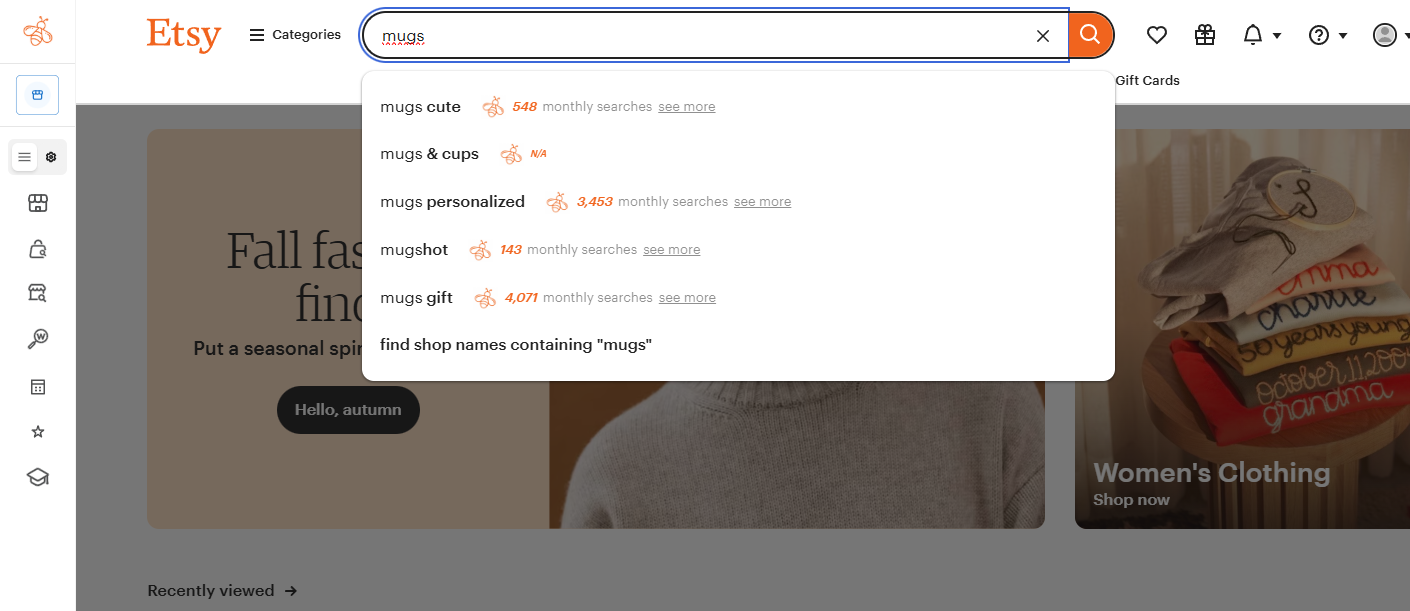
EverBee’s article on analyzing a keyword says the Chrome extension covers the Etsy page you are viewing, usually 64 listings. In the dashboard, EverBee Database is the control EverBee says uses listings associated with the keyword past that page. For a niche check, use the database view.
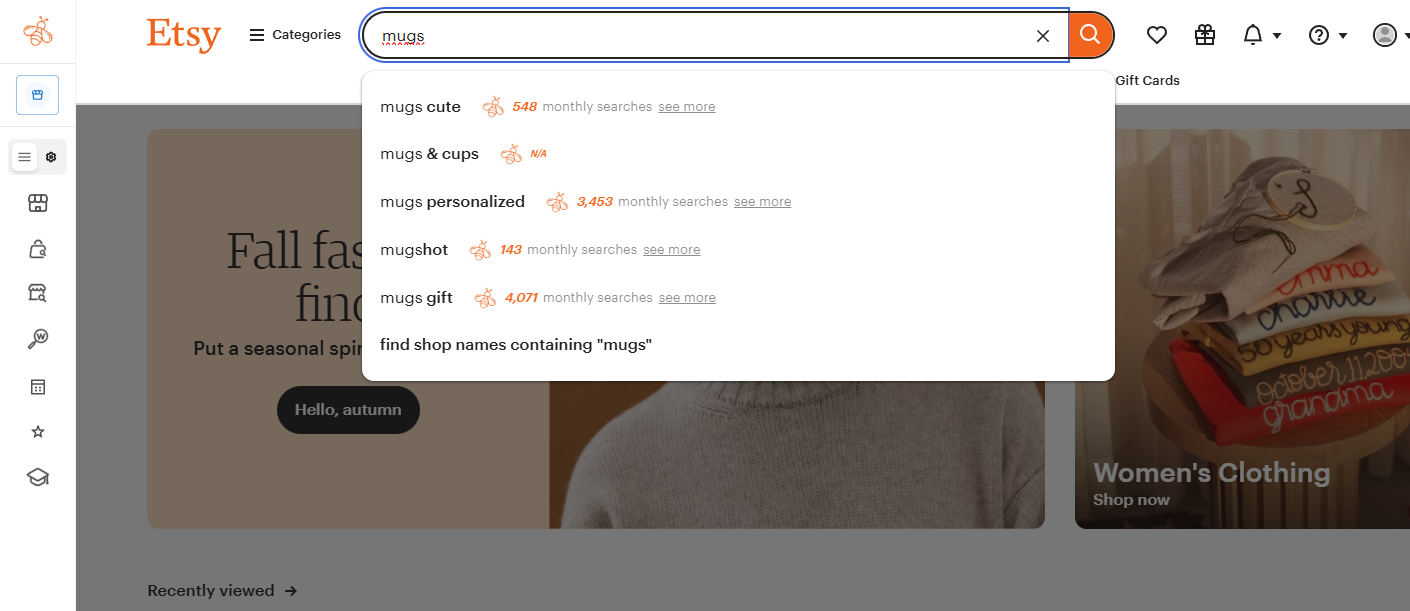
EverBee’s Chrome extension on an Etsy search for “mugs.” The monthly search counts are the ones printed in this screenshot.
Volume, competition, and Keyword Score are the Keyword Research screen. EverBee defines volume as Etsy searches in the last 30 days and competition as competing listings. The shortlist workflow is How to Use EverBee Keyword Research for Etsy. This page stops once you know the phrase is worth opening that screen.
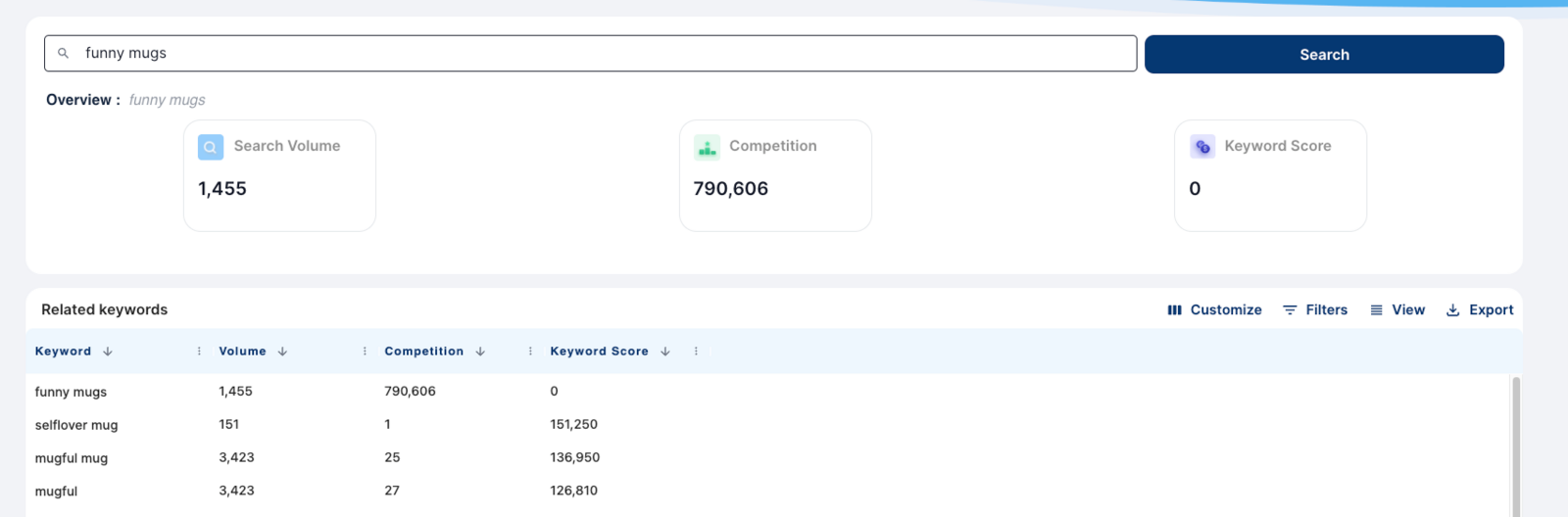
EverBee Keyword Research screenshot for “funny mugs.” The figures are the ones in this screenshot.
EverBee’s annual-offer page says the extension and the web app are the same subscription. Hobby has no sales columns. Sales estimates are on Growth and Business; EverBee Hobby vs Growth lists what each plan shows.
Try EverBee’s free Hobby plan →
Keep, narrow, or leave the phrase
Keep the phrase when Marketplace Insights shows searches in the last 30 days, the search page shows an object you can make, and attention is spread across shops. On a paid plan, read estimated sales next to listing age. On Hobby, use views, reviews, favorites, and listing age. EverBee’s top-selling article also says to look at design, materials, customization, packaging, and what shoppers pay. The sales columns do not do that part.
Narrow it when a related term, or a search suggestion, names that object more tightly and still has searches. Spend the next Marketplace Insights lookup there.
Leave it when the search page is a different product, or when you cannot make what that page is selling. A quiet sales column is a weak reason to leave on its own. EverBee says estimates can miss listings that convert better than their views suggest, and Hobby does not show sales.
When a phrase stays, move to individual listings, then put words through Keyword Research before they go into a title or a tag. After you list, Shop Stats → Etsy search shows which terms brought people in.
Mistakes that spend the 15 free searches
- Looking up “gifts,” “shirt,” or “digital download.” That spends one of 15 searches on a category.
- Counting tiles on your results page. Etsy says those results depend on who is searching. Use the listings figure inside Marketplace Insights for the last 30 days.
- Reading monthly sales as units sold in the last 30 days. EverBee divides total estimated sales by listing age.
- Reading an empty Shop Stats term list on a new shop as an empty market.
- Waiting on saved searches or a 12-month chart. Etsy’s shop-updates article describes those extras as still rolling out.
FAQ
How many Marketplace Insights searches are free?
Etsy’s help article says 15 keyword searches a week are free. The remaining count sits above the search bar, and those results stay available for 7 days. Etsy Plus gets unlimited searches. The tool is on desktop and mobile web.
Can Shop Stats show demand for a niche I do not sell yet?
Shop Stats lists terms shoppers used to find your listings, under How shoppers found you → Etsy search. A phrase you have never listed will not appear there. Marketplace Insights shows searches and listings over the last 30 days for a keyword you type in.
How does EverBee define monthly sales?
EverBee’s Product Analytics article says monthly sales equal total estimated sales divided by listing age. Monthly revenue multiplies that by the estimated price. EverBee calls the sales figures a guide, not exact results, because Etsy does not share sales history.
Does Etsy have a Search Analytics tool for niches?
Etsy Help does not list a Shop Manager tool by that name. The documented free tools for a phrase you have not listed are the public search bar and Marketplace Insights. Shop Stats adds the terms that already find your listings.
Do I need a paid plan to check a niche in EverBee?
The Etsy steps need no EverBee plan. Hobby includes views, reviews, and favorites in Product Analytics, plus 10 keyword searches. Sales, revenue, and conversion rate are on Growth and Business.
After the phrase passes
How to find a niche on Etsy is three checks on one phrase: searches in the last 30 days, the listings Etsy associates with that phrase, and whether attention is spread across shops. Marketplace Insights and the search page are free, inside a 15-search weekly cap. EverBee Product Analytics adds estimated sales on a paid plan, and those figures stay estimates. Choose the phrase before you build a catalog around it. Once you are ready to photograph the product, the pixel spec is in our Etsy listing photo size guide.
Last updated: October 25, 2026. Marketplace Insights limits from Etsy’s Marketplace Insights help article. Search behavior from Etsy’s search and Shop Stats help articles. EverBee column definitions from the Product Analytics help article. Which plan shows sales columns, and that the extension and web app share one subscription, from everbee.io/pricing and everbee.io/annualoffer, checked on that date.