· ming · Guides · 10 min read
EverBee Etsy Fee Calculator: How to Estimate Etsy Profit Per Sale
EverBee's free Etsy Fee Calculator (also called the Etsy Profit Calculator) shows the listing, transaction and payment processing fees on a sale, then your net profit and margin. Here is what each field means, two worked examples, how Offsite Ads changes the result, and what the calculator leaves out.
Affiliate disclosure: This guide contains an affiliate link to EverBee near the end. If you sign up for a paid plan through it, SellerImageAI may earn a commission at no extra cost to you. The calculator itself is free.
Before you price a new Etsy product, you want one number: what you actually keep from a sale after Etsy’s fees and your own costs. EverBee has a free tool for exactly that. On everbee.io it’s called the Etsy Fee Calculator; in EverBee’s Help Center and inside the Chrome extension it’s the Etsy Profit Calculator or simply “Calculator.” It is the same idea in each place: enter a price and your costs, and it breaks out Etsy’s fees, your net profit and your margin.
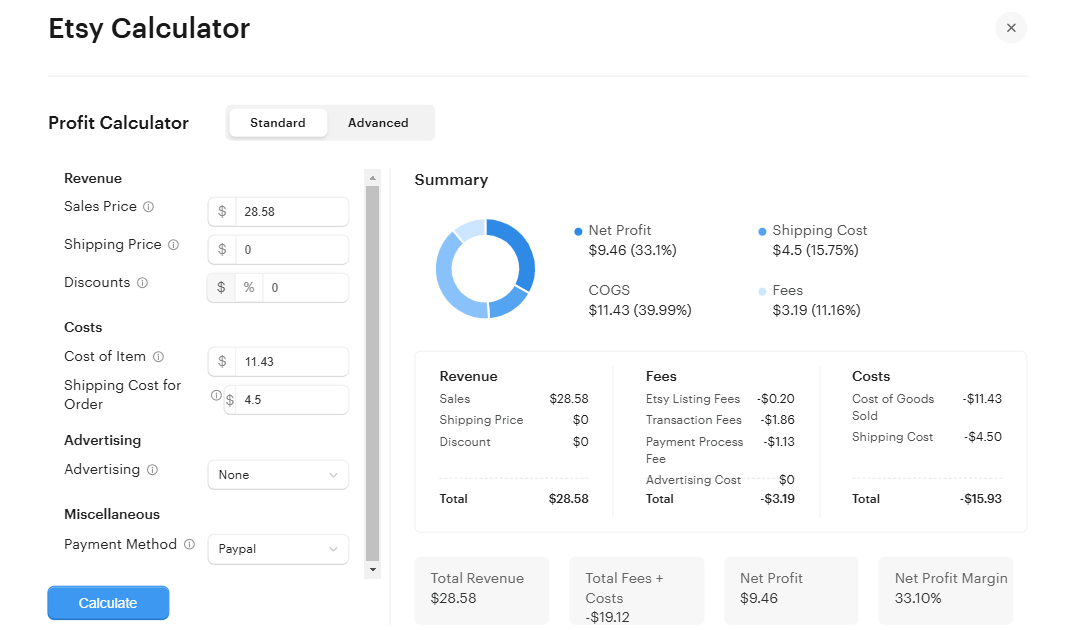
This guide is based on EverBee’s Etsy Fee Calculator page, the Help Center articles Etsy Profit Calculator, Welcome to EverBee and Product Analytics, plus Etsy’s own Fees & Payments Policy, How Etsy’s Offsite Ads Work and Regulatory Operating Fee help articles, all checked on October 21, 2026. We did not run the calculator on a live shop’s orders for this article. The header image is EverBee’s own screenshot of the calculator inside its app. Fee rates change, so confirm on Etsy’s current pages for your country.
Quick answer
- What it is: a free EverBee tool that subtracts Etsy’s $0.20 listing fee, 6.5% transaction fee and payment processing fee (about 3% + $0.25 in the US), plus your item and shipping costs, from what the buyer pays. It shows net profit and net profit margin.
- Where to find it: the free web version at everbee.io/etsy-fee-calculator (EverBee says no sign-up is needed), and a Calculator button on listing rows in EverBee’s Product Analytics and Chrome extension.
- Cost: free. EverBee’s FAQ on the page says the calculator is “completely free with no sign-up required.” It is not listed as a paid-plan feature on EverBee’s pricing page.
- Biggest caveat: it is a per-sale estimate. It doesn’t know your sales tax, currency conversion, Etsy Ads spend, or renewal fees on multi-quantity listings. Treat it as a pricing sanity check, not your bookkeeping.
Where to find the calculator
The free web version
Go to everbee.io → Free tools → Etsy Fee Calculator. On October 21, 2026, the page had three input groups and a summary panel:
| Section | Field | What EverBee says it means |
|---|---|---|
| Revenue | Sale price | Your listing price |
| Shipping charged | What you charge the buyer for shipping | |
| Discount | A sale or coupon, entered in $ or % | |
| Your costs | Cost of item | What it costs you to make or buy the item. EverBee’s tooltip says the default is 40% of list price for physical products |
| Shipping cost | What you pay to ship the order. The default is $4.50 for physical products | |
| Fees & ads | Seller country | United States, United Kingdom, Canada, Australia, Germany, France, India, or Other |
| Advertising | None or Offsite Ads (15%) |
The summary shows Net profit, % margin, Etsy fees, Cost of goods and Shipping cost, followed by line items for the listing fee, transaction fee, payment processing and Offsite Ads.
Always replace the defaults. A 40% cost of goods and $4.50 shipping are placeholders, not your numbers. For a digital download, set both to $0.
Inside EverBee’s app and Chrome extension
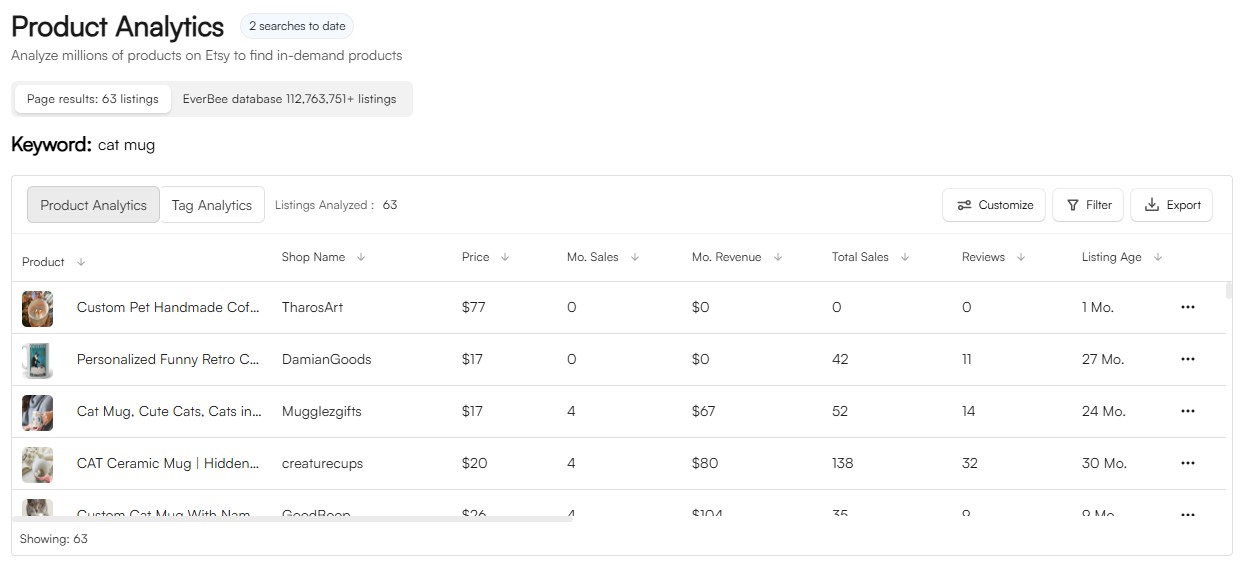
EverBee’s Product Analytics article says each listing row has a Calculator action: “a new page with the EverBee Etsy Calculator will appear on the Etsy page. You can also access it from the sidebar of your account.” That’s useful when you’re looking at a competitor’s listing and want to see what a similar product would earn at their price. Our EverBee Chrome extension guide shows where the row buttons sit.
The in-app version in the header image looks a little different from the current web page: it has Standard and Advanced tabs and a Payment Method dropdown (the example uses PayPal) instead of a seller-country picker. EverBee’s interface changes over time, so expect small differences.
Worked example 1: EverBee’s own screenshot
EverBee’s Help Center screenshot (the header image) shows a single physical item:
| Line | Amount in the screenshot |
|---|---|
| Sales price | $28.58 |
| Shipping price charged | $0 |
| Etsy listing fee | −$0.20 |
| Transaction fee | −$1.86 |
| Payment processing fee | −$1.13 |
| Advertising | $0 |
| Total fees | −$3.19 |
| Cost of goods sold | −$11.43 |
| Shipping cost | −$4.50 |
| Net profit | $9.46 |
| Net profit margin | 33.10% |
Two things stand out. First, Etsy’s fees ($3.19) were the smallest cost on this sale; the item cost ($11.43) and the free shipping the seller absorbed ($4.50) took far more. Second, the transaction fee matches Etsy’s published rate: 6.5% of $28.58 is $1.86.
Worked example 2: the web calculator’s sample numbers
On October 21, 2026, the web page loaded with a sample sale of a $25.00 item plus $5.00 shipping charged, a $6.00 item cost and a $4.00 shipping cost, with the seller country set to the United States. It showed:
- Total revenue: $30.00
- Etsy fees: $3.30 = listing fee $0.20 + transaction fee $1.95 + payment processing $1.15
- Your costs: $10.00
- Net profit: $16.70, a 55.7% margin
You can check the fee lines against Etsy’s US rates yourself:
- Transaction fee: 6.5% × $30.00 (item price plus shipping) = $1.95. Etsy charges the transaction fee on shipping too, which is why “free shipping” priced into the item and “$5 shipping” cost you the same 6.5%.
- Payment processing: 3% × $30.00 + $0.25 = $1.15.
- Listing fee: $0.20.
What happens when the sale comes from Offsite Ads
Switch Advertising to Offsite Ads (15%) when you want to see the worst case. Under Etsy’s Offsite Ads rules, a shop that has always made under $10,000 in any 365-day period pays 15% on an attributed order and can opt out; a shop that has reached $10,000 pays 12% and must stay enrolled. The fee is capped at $100 per order.
Applying Etsy’s 15% to the $30.00 order above is a further $4.50, which drops net profit from $16.70 to about $12.20 and the margin from 55.7% to about 40.7% (our arithmetic from Etsy’s published rate; the calculator’s own rounding may differ by a few cents). On a low-priced item the hit is proportionally the same, so if a product only works at a thin margin, check it with Offsite Ads on before you commit.
What the calculator does not include
EverBee’s page itself says to treat the result as “a close estimate” and that “some countries add a regulatory operating fee.” Before you rely on the number, add the costs a simple per-sale calculator can’t see:
- Regulatory operating fee in some countries. Etsy’s help article lists country rates, for example 0.48% in the UK and 0.80% in Italy, charged on the item price plus shipping. The US has none.
- Currency conversion if your shop currency differs from your payment account currency. Etsy’s fee policy lists this separately.
- Etsy Ads (onsite ads you set a daily budget for). The calculator’s advertising menu covers Offsite Ads only.
- Renewal fees. Etsy’s listing fee is $0.20 per listing for four months. On a multi-quantity listing, each additional item sold triggers another $0.20 renewal, and listings that don’t sell still cost $0.20 when they renew.
- Sales tax and VAT. Etsy collects these in many places; they’re not your revenue.
- Packaging, your time and returns. EverBee’s own Help Center article tells sellers to include labor and packaging in product cost, and taxes to check with an accountant.
If you want order-level profit tracking for an existing shop rather than a one-off estimate, that’s a different kind of tool; see EverBee vs ProfitTree for how the two approaches differ.
How to use it when choosing what to sell
A simple routine that uses only free tools:
- Find a comparable listing. Use Etsy search or EverBee’s free Hobby plan to look at what similar items sell for. Our guide to seeing other sellers’ Etsy sales explains which numbers are estimates.
- Enter that price, not your hoped-for price. Put the competitor’s price in Sale price and your realistic shipping charge in Shipping charged.
- Enter your real costs. Get a supplier or print-on-demand quote for Cost of item and a postage estimate for Shipping cost. EverBee’s Help Center suggests taking a packaged product to the post office for a real quote.
- Run it twice: once with Advertising = None, once with Offsite Ads (15%).
- Decide. If the margin is still acceptable with Offsite Ads on and a typical discount applied, the product is worth testing. If it only works with no ads and no discounts, rethink the price or the product.
For keyword demand on the same product idea, pair this with EverBee keyword research. For a competitor’s whole catalog, see the EverBee Shop Analyzer guide.
To work backward from a target profit to a list price, use how to price handmade items on Etsy.
Is the calculator a reason to pay for EverBee?
No. The calculator is free, and the math is simple enough that a spreadsheet can do the same once you know Etsy’s rates. What EverBee charges for is research data: per everbee.io/pricing on October 21, 2026, the free Hobby plan shows Product Analytics views, reviews and favorites with 10 keyword searches, while Growth adds estimated sales, revenue and conversion rate, unlimited keywords with Keyword Score, and Tag Analyzer. Business is the higher tier; see the official pricing page for current pricing. There’s no free trial, but Hobby needs no credit card. Our Hobby vs Growth breakdown covers what each plan unlocks.
FAQ
Is the EverBee Etsy Fee Calculator free?
Yes. EverBee’s page says it is “completely free with no sign-up required.” The same calculator is also available from listing rows in EverBee’s app and Chrome extension.
What Etsy fees does the EverBee calculator include?
The $0.20 listing fee, the 6.5% transaction fee, the payment processing fee for the selected seller country (about 3% + $0.25 in the US), and optionally the 15% Offsite Ads fee. It does not include Etsy Ads spend, currency conversion, sales tax or renewal fees on multi-quantity listings.
Does the transaction fee apply to shipping?
Yes. Etsy’s 6.5% transaction fee applies to the item price plus the shipping you charge, which is why the calculator’s sample shows $1.95 on a $25 item with $5 shipping.
How accurate is the EverBee profit calculator?
It uses Etsy’s standard published rates, so the fee lines should be close for a typical order. EverBee itself calls the result “a close estimate.” Your actual payout can differ because of regulatory operating fees in some countries, currency conversion, discounts applied differently, and Offsite Ads attribution you can’t predict.
Can I use it for digital downloads?
Yes. Set Shipping charged and Shipping cost to $0 and replace the default cost of item (40% of price) with your real cost, which is often close to $0 for a digital file. The listing, transaction and payment processing fees still apply.
Final verdict
EverBee’s Etsy Fee Calculator is a quick, free way to see whether a product idea leaves you any margin after Etsy’s fees, your costs and a possible Offsite Ads charge. Use it with real cost and shipping numbers, run it with and without Offsite Ads, and remember the extra fees it can’t see. If you then want estimated sales and revenue for the competitor listings you’re pricing against, that’s where EverBee’s paid research plans come in, and you can start on the free Hobby plan.
Last updated: October 21, 2026. Calculator fields and sample values from everbee.io/etsy-fee-calculator; fee rates from Etsy’s Fees & Payments Policy and Etsy Help; EverBee plans from everbee.io/pricing, all checked on that date.