· ming · Guides · 7 min read
EverBee Tag Analyzer: What It Shows and When to Use It
What EverBee Tag Analyzer is for, when to use it after Keyword Research, Hobby vs paid limits from the pricing page, and how to turn competitor tags into ideas—not copies—for your own Etsy titles and tags.
Affiliate disclosure: This guide contains affiliate links to EverBee. If you sign up for a paid plan through them, SellerImageAI may earn a commission at no extra cost to you.
EverBee’s Tag Analyzer is the feature you reach for after you have a niche or product direction—not before. It shows the tags and keywords competitors use on their listings, so you can turn real Etsy listing language into candidates for your own research.
This page is based on EverBee’s Welcome guide, How to optimize your tags and the live pricing page (checked October 16, 2026). We have not run a hands-on Tag Analyzer test for this article. Treat plan limits and UI labels as what EverBee publishes publicly; confirm inside your own account before you upgrade.
If you still need the broader research workflow, start with how to use EverBee Keyword Research, including how Keyword Score is calculated.
Quick answer
- What it is: EverBee describes Tag Analyzer as a way to analyze all the tags/keywords your competitor uses (Welcome to EverBee).
- When to use it: after you already have a niche or product idea and a shortlist of competitor shops/listings—not as your first research step.
- Where it fits: after Keyword Research and Product Analytics shortlisting; before you finalize titles and the 13 Etsy tags.
- Hobby vs paid: EverBee’s pricing comparison table lists Tag Analyzer on Growth and Business, not on free Hobby. If anything in the app or another marketing page looks different, trust the account UI and re-check pricing.
- How to use the output: treat competitor tags as ideas to validate in Keyword Research (volume, competition, score)—not as a list to copy.
What Tag Analyzer is for
Etsy lets each listing use up to 13 tags, each up to 20 characters. Tags help Etsy match shopper searches to listings. EverBee’s tag-optimization guide walks through finding those phrases by studying competitors, brainstorming buyer language and using long-tail keywords rather than only broad terms like “jewelry.”
Tag Analyzer is the EverBee-side shortcut for the competitor half of that job. According to EverBee:
- You can open individual listing analytics (Bee logo on a listing) or Listing Details to see tag-related insights.
- You can use Tag Analytics / Tag Analyzer for tags used across a shop’s listings or a competitor’s listings.
- If you already have a competitor in mind, EverBee suggests Shop Analyzer first, then Tag Analyzer to pull the tags found in that shop’s listings (How to optimize your tags).
In plain English: once you know who is selling something close to your idea, Tag Analyzer helps you see how they describe it in tags.
When to use it (and when not to)
Use Tag Analyzer when:
- You already picked a niche or product type (for example, personalized pet tags, not “gifts”).
- You have a few strong competitor shops or listings from Product Analytics / Shop Analyzer.
- You need real listing language to expand a seed keyword list before writing titles and tags.
Skip it (for now) when:
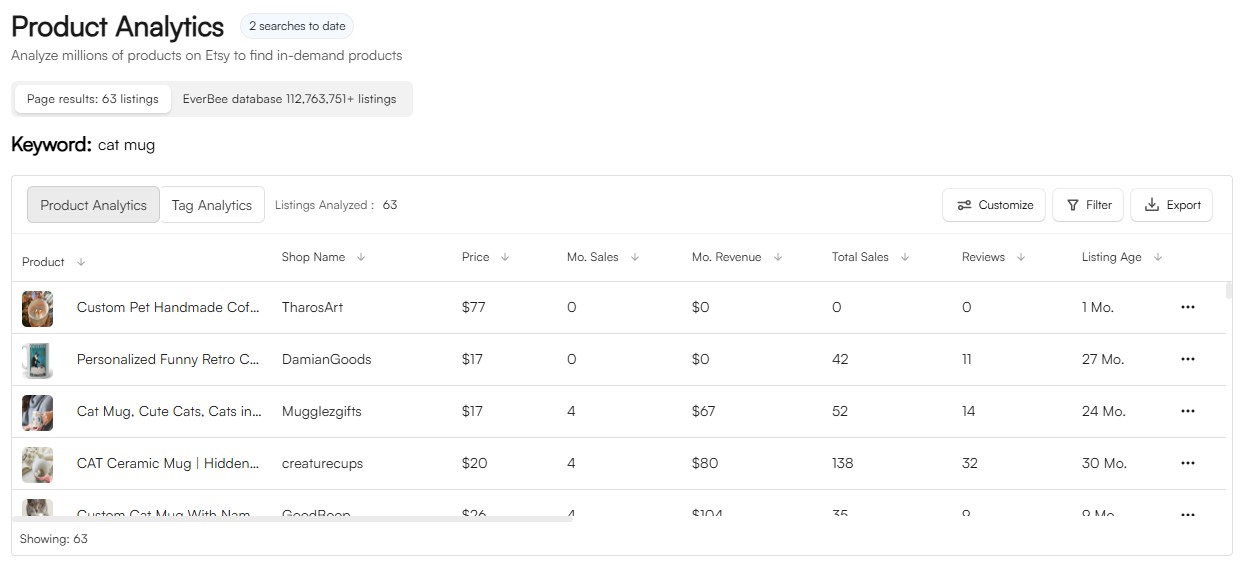
- You are still deciding what to sell. Start with Product Analytics sales/revenue signals on a paid plan, or Hobby’s limited views/reviews/favorites, plus free Etsy browsing. See how to see Etsy sales of other sellers.
- You only need search volume and competition for phrases you already thought of—Keyword Research alone may be enough.
- You are still on Hobby and just testing the Chrome extension. Tag Analyzer is listed as a paid feature on pricing; free time is better spent on seed lists and the 10 Hobby keyword searches. Our Hobby vs Growth guide covers the upgrade decision.
How it fits after Keyword Research
A practical order that matches EverBee’s own help content:
- Niche / product direction — Product Analytics and Shop Analyzer to find listings that look like demand. The search, sort and filter steps are in how to find best-selling items on Etsy with EverBee.
- Seed keywords — brainstorm buyer language (material, recipient, occasion, style).
- Keyword Research — check volume, competition and (on paid plans) Keyword Score. Full workflow: EverBee Keyword Research for beginners.
- Tag Analyzer — pull tags from the competitor listings you already shortlisted.
- Validate — run promising competitor tags back through Keyword Research so you keep phrases with real search demand, not only phrases that sold for someone else.
- Write titles and tags — follow Etsy’s 13-tag / 20-character rules; mix broader and long-tail phrases.
That order matters because Tag Analyzer without a niche produces a pile of unrelated tags. Keyword Research without competitor tags can miss phrases buyers actually see on winning listings.
Open EverBee (affiliate link) →
Hobby vs Growth: what the pricing page says
On EverBee’s pricing page (checked October 16, 2026):
| Plan | Tag Analyzer (pricing table) | Nearby keyword limits |
|---|---|---|
| Hobby (free) | Not listed (shown as unavailable in the feature table) | 10 keyword searches; no Keyword Score |
| Growth | Included | Unlimited keyword research with Keyword Score |
| Business | Included | Same keyword research; higher favorites / filter / store limits |
For Growth and Business, check current price on the official pricing page. Hobby needs no credit card. EverBee’s FAQ says there is no separate free trial of paid plans—Hobby is the free entry point.
Caveat we already call out elsewhere: EverBee’s marketing or keyword-research FAQ text has sometimes mentioned Tag Analyzer near Hobby wording, while the pricing comparison table does not include it on Hobby. We follow the pricing table. If your account shows something different, use what you see in-product and re-check pricing.
For the full free-vs-paid picture (sales columns, trends, AI Actions, MCP), see EverBee Hobby vs Growth and the EverBee Review 2026.
How to use Tag Analyzer without copying competitors
EverBee’s own tag guide says: research competition for inspiration, don’t copy their keywords exactly. Practical rules:
- Filter for relevance first. Only keep tags that accurately describe your product.
- Prefer long-tail over mega-broad. “Handmade bohemian jewelry” style phrases usually beat a lone word like “jewelry” for a new shop.
- Re-check volume and competition. A tag that works for a shop with thousands of reviews can still be too crowded for you. Put candidates into Keyword Research (and optionally Etsy’s Marketplace Insights if you have Shop Manager).
- Mix sources. Combine Tag Analyzer ideas with Etsy search-bar suggestions and your own buyer language.
- Respect Etsy limits. 13 tags, 20 characters each; use multi-word phrases and variety rather than repeating the same stem.
The EverBee Chrome extension is often where you notice a listing worth studying; Tag Analyzer (and Shop Analyzer) deepen that pass once you are on a paid plan.
Common mistakes
- Using Tag Analyzer before you have a niche. You will collect tags from unrelated winners.
- Pasting competitor tags into your listing unchanged. Etsy matches relevance and engagement, not just shared tags. Photos, price and reviews still matter.
- Ignoring Keyword Score / volume after Tag Analyzer. Tags without demand waste slots.
- Assuming Hobby includes it. Pricing lists Tag Analyzer under Growth and Business—confirm before you plan a free-only workflow around it.
- Skipping the rest of the suite context. If you are comparing tools, see EverBee vs eRank for SEO-first alternatives.
FAQ
What does EverBee Tag Analyzer show?
EverBee describes it as analyzing the tags and keywords competitors use on listings. Exact columns and screens can change; the Help Center frames it as competitor tag analysis alongside Keyword Metrics (competition, volume, score).
Is Tag Analyzer on the free Hobby plan?
EverBee’s public pricing comparison table does not include Tag Analyzer on Hobby. It is listed for Growth and Business. Confirm on the live pricing page and in your account.
When should I use Tag Analyzer vs Keyword Research?
Use Keyword Research to measure phrases you already have. Use Tag Analyzer to discover phrases from competitor listings after you know which competitors matter. Then send those discoveries back into Keyword Research.
Do I need an Etsy shop to use it?
EverBee says you can research with a connected Etsy account (buyer or seller) without already having an active shop. Tag Analyzer still sits on paid plans per pricing.
Related guides
- EverBee Shop Analyzer: how to analyze a competitor Etsy shop
- How to use EverBee Keyword Research for Etsy
- EverBee Hobby vs Growth: free plan limits
- EverBee Review 2026
- EverBee Chrome extension guide
- How to see Etsy sales of other sellers
- EverBee vs eRank for beginners
Last updated: October 16, 2026. Plan limits cited from EverBee’s pricing page on that date.