· ming · Guides · 10 min read
How to Cancel Your EverBee Subscription (and Get a Refund)
Step-by-step EverBee cancellation from the Billing tab, what EverBee's refund policy says for monthly and annual plans, what to do if a charge is past due, and how to disconnect your Etsy shop, remove the Chrome extension or delete your account.
Affiliate disclosure: This page contains an affiliate link to EverBee’s free Hobby plan near the end. If you sign up through it, SellerImageAI may earn a commission at no extra cost to you. It doesn’t change any of the cancellation steps below.
Cancelling EverBee takes about a minute, but three details catch people out: stopping use does not cancel the plan, a past-due charge blocks self-service cancellation, and refunds have to be requested, with a short window on monthly plans.
This guide is based on EverBee’s Help Center articles on cancelling, managing your subscription, invoices and disconnecting an Etsy shop, EverBee’s Terms of Service and pricing page, plus Etsy’s and Google’s help pages, all checked on October 19, 2026. We did not cancel a paid EverBee plan for this article; the screenshots are EverBee’s own Help Center images. Menus and policies change, so follow what your account shows.
Quick answer
- Where: sign in → Options → Account → Billing → Manage plan → Cancel subscription.
- When it ends: EverBee says you won’t be charged again, and the subscription ends on the last day of the current monthly or annual billing cycle.
- Must be active: you can’t cancel yourself if the subscription has a pending (past-due) charge. Contact support through live chat or
hello@everbee.io. - Refunds: monthly plans can be refunded if you contact EverBee within 3 days of purchase. Annual plans get a pro-rated partial refund, capped at eight months’ worth. Clicking Cancel alone doesn’t request a refund.
- Not the same as cancelling: uninstalling the Chrome extension, disconnecting Etsy or simply not logging in does not stop billing.
- Delete the account: ask EverBee through live chat or by email; there’s no self-serve delete button in the help article.
Before you cancel: a 2-minute checklist
- Check the plan and billing cycle. Options → Profile → Manage Billing opens EverBee’s Stripe billing page, where you can see your current plan (monthly or annual), payment method and invoices (Manage your subscription).
- Note the date of your last payment. On a monthly plan, it decides whether a refund request is still inside the 3-day window.
- Download invoices you need for bookkeeping now. EverBee says invoice history is only self-serve for active subscriptions; after that you have to email support for copies (Check your invoice history).
- Save research you want to keep. The free Hobby plan allows favorites for only 5 keywords, 5 shops and 1 custom folder, versus 1,000 keywords and 100 shops on Growth (pricing). EverBee’s Terms say a downgrade “may cause the loss of account content, features, or capacity.”
- Look for a past-due invoice. If the billing page shows “Past due,” skip to the section below.
How to cancel EverBee step by step
Per EverBee’s Cancel your subscription article:
- Sign in to your EverBee account on the web app.
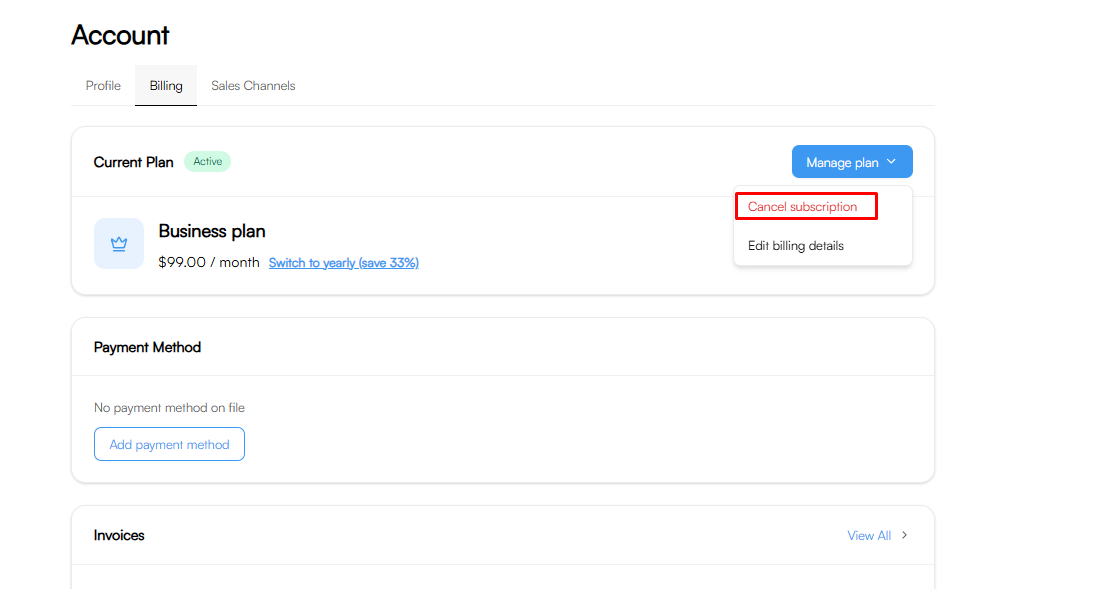
- In the left sidebar, open Options → Account, then select the Billing tab (next to Profile and Sales Channels).
- Next to Current Plan, click Manage plan.
- Choose Cancel subscription and confirm.
The image at the top of this page is EverBee’s own screenshot of that menu. After you cancel, the Stripe billing page should show the plan as still Active with a “Cancels [date]” label and “No future invoices”:
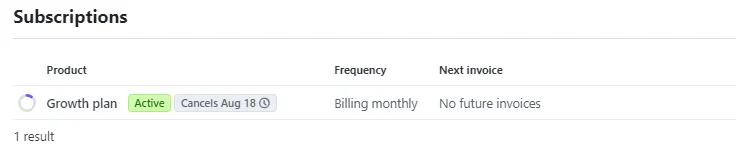
Source: EverBee Help Center screenshot. The date shown is EverBee’s example, not a real account.
If you don’t see a “Cancels” label or the next invoice still shows an amount, the cancellation didn’t go through. Contact support before the renewal date.
What happens after you cancel
- No more charges. EverBee says that after you apply for cancellation, “you won’t be charged again.”
- Paid access runs to the end of the cycle. The subscription is cancelled on the last day of the monthly or annual billing period you’ve already paid for.
- Ignoring it doesn’t cancel it. EverBee is explicit: leaving the subscription running or simply stopping using your account “won’t cancel it automatically.” Its Terms (section 2.1) say plans renew automatically for the same term unless you choose not to renew.
- Paid-only data goes away. Sales, revenue and conversion rate in Product Analytics, unlimited keyword research with Keyword Score, Tag Analyzer and AI Actions are Growth and Business features on the pricing page. Our EverBee Hobby vs Growth guide lists what the free plan keeps.
The help article doesn’t say in so many words whether the account drops to the free Hobby plan when the paid period ends. Hobby is free and needs no card, so if you want to keep using the free features, ask support to confirm when you cancel.
EverBee refund policy: monthly vs annual
Section 2.4 of EverBee’s Terms of Service sets out the refund rules:
| Plan type | What the Terms say | What it means in practice |
|---|---|---|
| Monthly | If you contact EverBee within three (3) days of purchasing to terminate, it will refund the amount of your last payment | Ask within 3 days of the charge. Whether a renewal counts as a new “purchase” isn’t spelled out, so ask support right away if a renewal surprised you |
| Annual | ”Partial refunds are available” as a pro-rated refund up to a maximum of eight months’ worth, “regardless of the specific month you cancel” within the year | You won’t get the full year back. At most, eight months’ worth of the annual price comes back |
| Seasonal offers | May have their own refund terms, stated in the offer | Check the terms of the specific promotion you bought |
The Terms say this policy applies to all EverBee products, “such as EverBee Research and EverBee Email.”
How to ask for a refund: cancel the subscription as above, then contact EverBee through the live chat in the app or at hello@everbee.io. Include your account email, the plan, the invoice date and amount, and the date you cancelled. The Terms describe a refund that starts with you contacting EverBee. Cancelling in the dashboard only stops future charges.
The annual figure above is our arithmetic on the public price, not a quote from EverBee. Ask support how the pro-rating is calculated for your plan before you count on a specific amount.
If you have a past-due or pending charge
EverBee’s help article says you can’t cancel a subscription that has a pending charge, because “the payment system can’t interact with invoices that have already been processed.” The same limit applies to viewing the billing page.
In that case, contact EverBee’s support through live chat or hello@everbee.io and ask them to cancel the plan and resolve the open invoice. Don’t just remove your card: EverBee’s Terms let it keep billing the card on file until the plan is cancelled, and an unpaid invoice stays open.
Downgrade instead of cancelling?
If the problem is price rather than the tool, a downgrade may be enough:
- Business → Growth. Growth costs less than Business on both annual and monthly billing. Check current price on the pricing page.
- Growth → Hobby. The free plan keeps limited Product Analytics (views, reviews, favorites), 10 keyword searches and basic filters.
- How the billing changes: under section 2.5 of the Terms, a downgrade is charged at the new rate from your next billing cycle, not refunded part-way through. An upgrade is charged pro rata immediately.
The pricing FAQ says you can upgrade or downgrade “whenever you need to.” A common low-cost pattern is to stay on Hobby most of the year and pay for one month of Growth only during an active product-research push.
Cancel vs disconnect vs uninstall vs delete
These are four separate actions. Only the first stops billing.
| Action | Where | What it does | Stops billing? |
|---|---|---|---|
| Cancel subscription | EverBee → Options → Account → Billing → Manage plan | Ends the paid plan at the end of the billing cycle | Yes |
| Disconnect Etsy shop (in EverBee) | EverBee → your name (bottom of sidebar) → Profile → Sales Channels → disconnect icon in the Options column | Removes the shop from your EverBee account (help) | No |
| Revoke EverBee on Etsy | Etsy → Account settings → Apps → Connected apps → Revoke | Stops the app’s future access to your Etsy data (Etsy Help) | No |
| Remove the Chrome extension | Chrome → More (⋮) → Extensions → Manage extensions → Remove | Removes EverBee from your browser (Chrome Help) | No |
| Delete your EverBee account | Request via EverBee live chat or hello@everbee.io | Account deletion handled by support | Cancel first to be safe |
Etsy’s help page notes that revoking an app stops future access, but the app “may retain data that they previously received,” and that you should contact the developer to cancel a subscription or request account deletion. If you’re cancelling for privacy reasons, do all of it: cancel, disconnect, revoke on Etsy, then ask EverBee to delete the account.
If you’re switching tools
Cancelling because EverBee isn’t the right fit, not because you’re leaving Etsy research altogether? These comparisons may help you choose the next tool before your paid period runs out:
- EverBee vs eRank: listing SEO and rank tracking at a lower price
- EverBee vs Sale Samurai: cheaper keyword research plus listing-writing tools
- EverBee vs Alura: research tool or all-in-one suite
- EverBee Review 2026: what the paid data actually includes
FAQ
Does uninstalling the EverBee Chrome extension cancel my subscription?
No. Removing the extension only removes it from your browser. EverBee says a subscription is not cancelled automatically if you stop using your account. Cancel under Options → Account → Billing → Manage plan.
Will I be charged again after I cancel EverBee?
EverBee’s help article says no: after you apply for cancellation you won’t be charged again, and the plan ends on the last day of the current billing cycle. Check that the Stripe billing page shows “Cancels [date]” and no future invoices.
Can I get a refund from EverBee?
For monthly plans, EverBee’s Terms say it will refund your last payment if you contact it within three days of purchase. Annual plans are eligible for a pro-rated partial refund up to a maximum of eight months’ worth. Seasonal promotions can have different terms. Contact hello@everbee.io or live chat to request it.
Why can’t I cancel my EverBee subscription?
The most common reason in EverBee’s help article is a pending or past-due charge: the subscription must be active to cancel it yourself. Contact support through live chat or hello@everbee.io to cancel and sort out the open invoice.
How do I delete my EverBee account?
EverBee’s help article says to request account deletion through its live chat or by email. Cancel any paid plan first, and consider disconnecting your Etsy shop and revoking EverBee in Etsy’s Apps settings too.
Can I keep using EverBee for free after cancelling?
EverBee’s Hobby plan is free with no credit card, with limited Product Analytics (views, reviews, favorites), 10 keyword searches and small favorites limits. Ask support to confirm your account stays on Hobby after the paid period ends.
Bottom line
Cancel from Options → Account → Billing → Manage plan → Cancel subscription, confirm the Stripe page shows a “Cancels” date, and ask for a refund separately and quickly if you’re within three days of a monthly charge or on an annual plan. Remember that uninstalling the extension or disconnecting Etsy doesn’t stop billing.
If you later want EverBee’s data again without a paid plan, the Hobby plan is free and needs no card:
EverBee free Hobby plan (affiliate link) →
Last updated: October 19, 2026. Steps and policy wording cited from EverBee’s Help Center, Terms of Service and pricing page on that date.