
· ming · Reviews · 9 min read
eRank vs ListingView: Keywords or Etsy Sales?
Use eRank for daily keyword lookups and listing audits. Use ListingView for estimated sales on the Etsy page, bulk edits, and mockups.
This page has no affiliate link for eRank or for ListingView.
Use eRank when you want keyword lookups, tags, and audits of your own listings, and use ListingView when you want estimated sales on the Etsy page plus bulk listing edits or mockups.
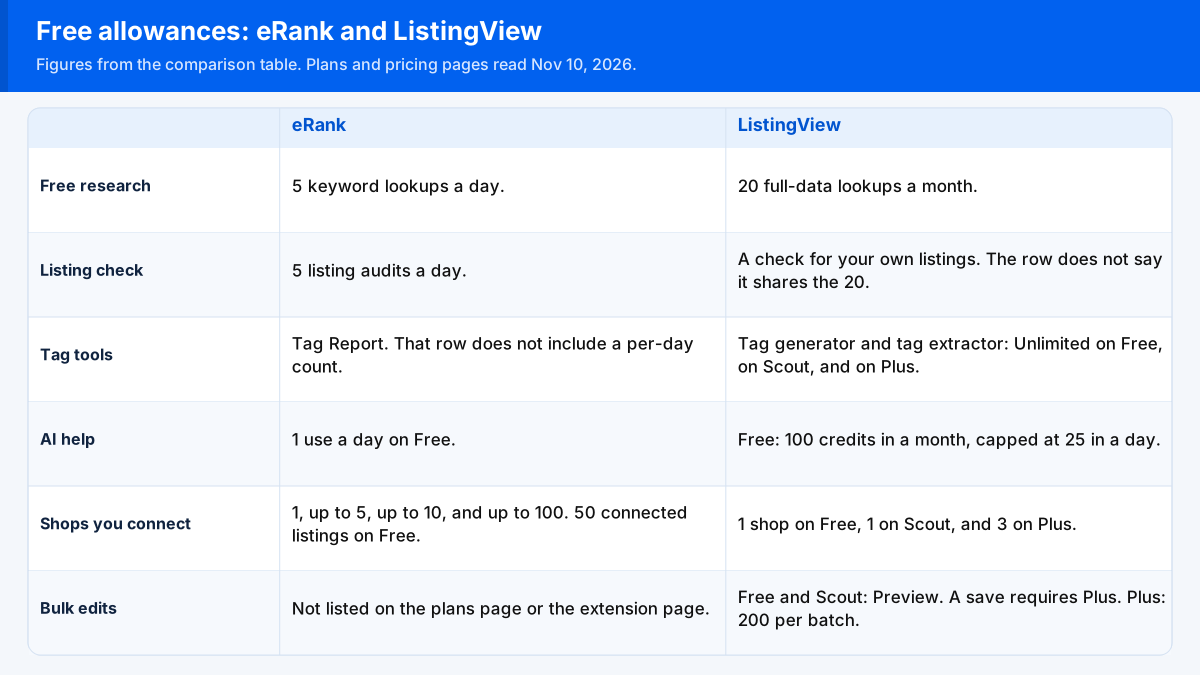
That eRank vs ListingView split is also a quota split. eRank’s free plan resets a small allowance every day, and ListingView’s pricing page shares 20 full-data lookups across a month. Names and caps below are what those sites showed on Nov 10, 2026. Check current price on each plan page before you pay.
eRank vs ListingView: daily caps beside a monthly pool
eRank cells come from the plans page unless the cell names the extension page. ListingView cells come from the pricing page unless the cell names another ListingView URL. The default grid on that pricing page has three columns: Free, Scout, and Plus. Scale and Scale Max appear as labels on the credit calculator, not as extra columns in that default grid.
| Difference | eRank | ListingView |
|---|---|---|
| Free research allowance | Free card and Keyword Tool row: 5 keyword lookups a day. Basic 100, Pro 200, and Expert 500, each a day. | Free card: 20 full-data lookups a month. Keyword research, shop and competitor analysis, trends and market data, trademark checks, and browser extension lookups are Limited and share that 20. Scout and Plus mark keyword research, shop analysis, trends, and extension lookups Unlimited. |
| 30 days at the free keyword cap | 5 times 30 is 150. That 150 is multiplication on this page. The plans page does not print 150, and it does not say unused lookups move to the next day. | The published pool is 20 for the month, shared by the rows above. The pricing page does not describe that pool as a daily reset. |
| Listing check on Free | 5 listing audits a day. Basic 50, Pro 200, and Expert 500, each a day. Five a day times 30 is 150 audits in 30 days, again multiplication on this page. | The audit row is a check for your own listings. That row does not say it shares the 20. Scout and Plus mark the row Unlimited. |
| Tag tools | The plans page names a Tag Report. The text of that row does not include a per-day count. | Tag generator and tag extractor read Unlimited on Free, on Scout, and on Plus. |
| AI help, a separate counter | AI Listing Helper: 1 use a day on Free, then 10, 20, and 100 a day on Basic, Pro, and Expert. One a day times 30 is 30 uses in 30 days, multiplication on this page. | Credits, not the 20 lookups. Free lists 100 credits in a month, capped at 25 in a day. Scout lists 250 in a month, capped at 62 in a day. Plus lists 2,000 in a month, capped at 500 in a day. The credit calculator labels Scale at 10,000 a month and Scale Max at 25,000 a month. |
| Shops you connect | Shops Connected: 1, up to 5, up to 10, and up to 100. The cards also list connected listings: 50 on Free, 200 on Basic, 4,000 on Pro, and 5,000 on Expert. | Grid: 1 shop on Free, 1 on Scout, and 3 on Plus. The Plus card also says 3 connected shops. |
| Another shop’s sales estimate | Competitor Tracking is a counted list and a daily sales estimate for an Etsy shop. Cards: 5 on Basic, 50 on Pro, 200 on Expert. The Free card does not name a competitor count. A Key Features row prints 25, 50, and 200. A Competitive Intelligence row prints 1, 5, 50, and 200. The page does not say which count a plan enforces. | Shop and competitor analysis is Limited on Free and sits inside the shared 20. Scout and Plus mark it Unlimited. The row is a shop breakdown that includes estimated sales and best-sellers. |
| Extension websites | Extension FAQ names two depths. Full keyword and competitor research: Etsy and Amazon. Trending-keyword data: Printify, Shopify, eBay, and Teachers Pay Teachers. The plans row also names Etsy, Printify, Shopify, and Amazon. Chrome only. The FAQ says free use has daily search limits and does not print those limits. | The extension row says shop and listing data on Etsy. Research and the homepage describe that extension on Etsy listings and Etsy search. Those lines do not name Amazon, Shopify, eBay, or Teachers Pay Teachers. |
| Bulk edits and mockups | Not listed on the plans page or the extension page. | Free and Scout show the word Preview, and they say a save requires Plus. Plus shows a check and 200 per batch. Standard mockups: the Free card says 200 a day, and the Free and Scout grid cells also say Preview only. Plus says 1,000 a day. |
| After a paid plan is canceled | The control is on the settings page. Paid tools stay available until that billing period is over, and the membership then becomes Free. Nothing on that FAQ says the current period is paid back. Signing up for Free does not ask for a card, and the FAQ says the free membership has no time limit. | Cancelling document: access lasts until the paid period ends, then the account moves to the Free plan. Cancelling does not hand back the current period. Stopping the subscription keeps the files. Deleting the account is a separate step. The Free plan has no payment to cancel. |
The getting-started document, updated Mar 27, 2026, still prints a research allowance of 50 uses a month and puts AI tools on a paid plan. The pricing card opened Nov 10, 2026 says 20 full-data lookups a month and lists AI credits on Free. EverBee vs ListingView already lines those two ListingView pages up. The table here follows the pricing card.
Where each tool puts another shop’s sales
eRank’s plans page treats another shop’s sales as a watch list with a daily sales estimate, and it prints more than one count for how long that list can be. ListingView’s pricing grid treats the same job as a lookup. On Free that lookup sits in the shared monthly pool. From Scout upward, the same row says Unlimited. ListingView’s research page describes the shop and listing figures as estimates. What Etsy itself prints on a shop, before either tool, is in how to see Etsy sales of other sellers.
Which websites the extension opens on
eRank’s extension FAQ is the page that names Etsy and Amazon for full keyword and competitor research, and Printify, Shopify, eBay, and Teachers Pay Teachers for trending-keyword data. ListingView’s extension lines, on the pricing page, the research page, and the homepage, stay on Etsy listings and Etsy search.
The homepage does mention Printify in a different job. It describes reusing Printify products, variants, and pricing so one design is listed across that Printify range, with the listings built in bulk. That path creates Etsy drafts. It is not the extension opening on Printify the way eRank’s FAQ describes trending-keyword data there.
Which seller should open eRank or ListingView
Open eRank when the work is titles, tags, and a set number of keyword lookups and listing audits each day. The Free card lists 5 keyword lookups and 5 listing audits a day. A day that needs more than 5 keyword lookups is Basic or above. Once the phrases are in hand, the tag cap is how many tags on Etsy, and the field they have to fit is the Etsy title character limit.
Open ListingView Free when the shared 20 lookups in a month are enough and the audit you need is the check on your own listings. Open Scout when shop and competitor analysis has to be unlimited and you will not save bulk edits. Open Plus when you need the 200-per-batch editor, a CSV export, 3 connected shops, or the higher mockup line on that card. Scale and Scale Max are named on the credit calculator. Their shop and bulk cells were not in the default Free, Scout, and Plus grid, so this page does not assign them a shop count.
A different research tool is set beside each of these in EverBee vs eRank and EverBee vs ListingView.
A May 2025 post asked which shop tools exist
On May 15, 2025, a seller on r/EtsySellers who had been on Etsy since 2020 asked for a tool list and wrote, “I learned about eRank and Marmalead. I’ve been on Etsy since 2020 and never knew these guys existed. What else is out there?” The same post asks what people use to manage a shop and find keywords. It does not sort a daily keyword cap from a monthly lookup pool. That sort is the table above.
Where the Nov 10 figures were read
The eRank daily caps, the three competitor counts, the connected-shop row, the listing counts on the cards, and the cancel FAQ are from the plans page, opened Nov 10, 2026. The extension marketplace list is from that page’s marketplace answer, opened the same day. ListingView’s 20-lookup pool, the Unlimited shop-analysis cells, the shop counts, the Plus bulk-edit cell, and the Scale and Scale Max credit labels are from the pricing page. The move back to the Free plan after cancel, and the note that the current period is not refunded, are from ListingView’s cancelling document. The 150-lookup stretch, the 150-audit stretch, and the 30 AI uses are 5 times 30, 5 times 30, and 1 times 30. The getting-started document still shows a different free research cap, as the paragraph under the table says.
FAQ
Does eRank’s free keyword cap reset each day?
The plans page lists 5 keyword lookups a day on Free, and 100, 200, and 500 a day on Basic, Pro, and Expert. It does not say unused lookups move to the next day. ListingView’s free research pool is 20 full-data lookups a month, shared by several tools.
Is shop analysis unlimited on ListingView Free?
No. On the pricing grid, shop and competitor analysis is Limited on Free and shares the 20 full-data lookups a month. Scout and Plus mark that row Unlimited.
Which sites does the eRank extension say it opens?
The extension FAQ says full keyword and competitor research on Etsy and Amazon, and trending-keyword data on Printify, Shopify, eBay, and Teachers Pay Teachers. It says the extension is for Google Chrome. ListingView’s extension lines opened for this page describe Etsy pages.
Does an eRank paid plan end the moment you cancel?
No. The control sits on the settings page. Paid tools stay on through the last day of the billing period, and the membership becomes Free after that. The same answer does not say the current period is paid back.
Does ListingView refund the current period when you cancel?
No. The cancelling document says you keep access until the period you already paid for ends, and that cancelling does not refund that period. On the end date the account moves to the Free plan. The Free plan has no payment to cancel.