
· ming · Reviews · 7 min read
EverBee vs ListingView: Which Tool for Which Job?
ListingView Plus is the one to pay for if you also bulk-edit Etsy listings; EverBee's pricing page lists no bulk editor. Either tool shows estimated demand.
Affiliate disclosure: SellerImageAI may earn a commission if you buy a paid EverBee plan through the link on this page. ListingView has no affiliate link here.
ListingView’s Plus plan is the one to pay for if you want research and bulk listing edits in one tool, because EverBee’s pricing page does not list a bulk listing editor. For estimated demand on an Etsy listing or shop alone, either tool covers it.
Plan names below are as of Nov 9, 2026. Check current price on each pricing page before you pay. ListingView’s research page calls the figures estimated sales, revenue, and keyword demand. EverBee’s help article says an algorithm uses data Etsy shares to make estimations.
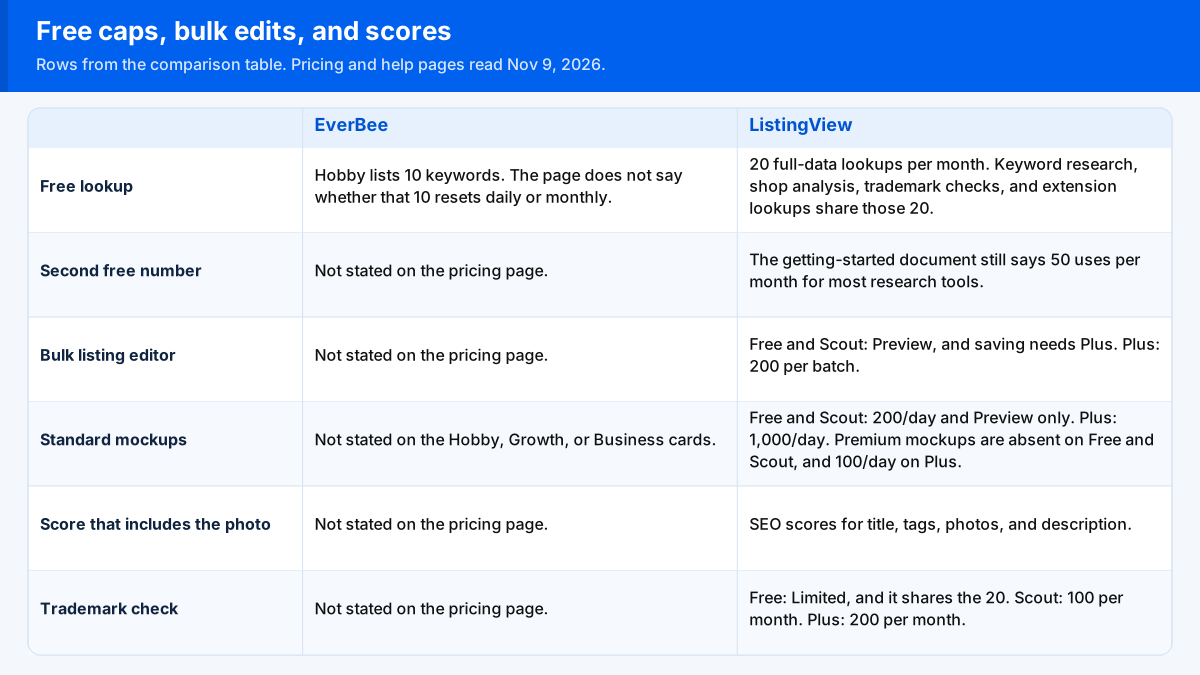
Free caps, bulk edits, and scores side by side
Each column comes from that tool’s pricing or help pages as they read on Nov 9, 2026, and “Not stated on this page” marks a line the page leaves out. The ListingView comparison grid labels its three columns Free, Scout, and Plus.
| Difference | EverBee | ListingView |
|---|---|---|
| What a free lookup counts as | Hobby lists 10 keywords. The page does not say whether that 10 resets daily or monthly. | The Free card lists 20 full-data lookups per month. On the grid, keyword research, shop analysis, trademark checks, and extension lookups are Limited and share those 20. |
| A second official free number | Not stated on the pricing page. | The getting-started document, updated Mar 27, 2026, still says 50 uses per month for most research tools. |
| Bulk listing editor | Not stated on the pricing page. | Free and Scout: Preview, and saving needs Plus. Plus: a check, 200 per batch. |
| Standard mockups | Not stated on the Hobby, Growth, or Business cards. | Free and Scout cells read “200/day” and “Preview only” together. Plus reads 1,000/day. Premium mockups are absent on Free and Scout, and 100/day on Plus. |
| Score that includes the photo | Not stated on the pricing page. | Listing Explorer, updated Mar 31, 2026, says to check SEO scores for title, tags, photos, and description. On the pricing grid, Free is a check for your own listings. Scout and Plus say Unlimited. |
| Trademark check | Not stated on the pricing page. | Free: Limited, and it shares the 20 full lookups. Scout: 100 per month. Plus: 200 per month. The row says the check covers a listing’s title, tags, and description against US trademark records. |
The Free plan card also lists 200 standard mockups a day, 100 A.I. credits a month, 1 GB of storage, and 1 connected shop, with no credit card. The same page’s Free mockup cell adds the words “Preview only”. The page does not define what preview-only changes.
Quotas that share one monthly lookup pool
A.I. credits on the ListingView grid are a separate counter from the 20 lookups. Free is 100 per month with a 25-per-day cap. Scout is 250 per month with a 62-per-day cap. Plus is 2,000 per month with a 500-per-day cap. The getting-started document says Listing Optimizer and AI features require a paid plan. Those two ListingView pages do not agree.
EverBee’s Hobby card does not list AI Actions. Growth lists 100 AI Actions per month. Business lists unlimited AI Actions. Hobby’s Product Analytics line is views, reviews, and favorites. Sales, revenue, and conversion rate are on the Growth and Business cards.
Shops on the ListingView grid: Free is 1 GB and 1 connected shop, Scout is 5 GB and 1 shop, and Plus is 50 GB and 3 shops. CSV export is absent on Free and Scout, and included on Plus. EverBee’s Growth card lists 3 store connections. Business lists unlimited store connections. The Hobby card does not list a count. EverBee’s pricing page does not list CSV. The Product Analytics article says a research export can be emailed as a CSV, and it does not name a plan.
Bulk edits, mockup labels, and the photo score
The homepage says a bulk edit can change prices, titles, tags, and descriptions, then undo up to 50 steps. The same page uses two other batch sizes for different steps: up to 100 designs become Etsy drafts in one batch, and ListingView A.I. writes a title, 13 tags, and a description for one listing or a batch of up to 500. Those lines are not the Plus grid’s 200-per-batch editor.
The homepage says the extension shows sales, revenue, and a Listing Score, plus a profit calculator and Etsy Ads CPC, on Chrome, Firefox, and Edge. Getting started says the extension is for Chrome on desktop, and that ListingView is designed for desktop browsers. For the same browser question across eRank, EverBee, Alura and Listadum, see which Etsy seller extensions work in Firefox and Safari.
EverBee’s pricing FAQ says you install the free Chrome extension and connect an Etsy account. Column meanings for that extension are on the EverBee Chrome extension page.
The pricing audit row says “title, tags, and SEO.” Listing Explorer adds photos. Getting started says the score cards cover title, tags, images, and description. For a photo-and-title check, use the Listing Explorer line.
Who should pick EverBee and who should pick ListingView
Pick EverBee Hobby when 10 keywords, plus views, reviews, and favorites, is enough and you will not bulk-edit. Pick Growth when you want sales, revenue, and conversion rate on that card, and the work stops at research. Those lines are on EverBee’s pricing page. Public shop totals, before either tool, are in how to see Etsy sales of other sellers.
Pick ListingView Free when 20 shared full-data lookups a month is enough. Pick Scout for that card’s unlimited product research and full sales and revenue data, without saving bulk edits. Pick Plus for the 200-per-batch editor, CSV, 3 shops, or 1,000 standard mockups a day. Those lines are on the ListingView pricing page.
A separate mockup app is the Dynamic Mockups review.
Not set on either? ListingView alternatives lines up eRank and Etsy’s built-in tools as well.
A new shop asked which paid research tool to buy
A seller who had just opened an Etsy shop asked on r/EtsySellers whether to pay for research tools first: “is the paid plan worth it? Which one would you recommend from the two or are there even better alternatives out there?” The post names EverBee and Alura. Use the free rows above before you pay.
Pages opened for this pair
Opened Nov 9, 2026:
- EverBee pricing
- How does EverBee work?
- EverBee Product Analytics
- ListingView pricing
- ListingView homepage
- ListingView research
- Listing Explorer
- ListingView getting started
ListingView’s pricing grid and getting-started document disagree on both the free research cap (20 versus 50) and AI access, so read the pricing card on the day you sign up.
FAQs
Does ListingView’s free plan save a bulk listing edit?
No. On the pricing grid, Free and Scout say Preview, and saving needs Plus. Plus shows a check and 200 per batch. EverBee’s pricing page does not list a bulk listing editor.
Why do two ListingView pages give two free research caps?
The pricing page says 20 full-data lookups per month on Free, and several Limited tools share that 20. The getting-started document, updated March 27, 2026, says 50 uses per month for most research tools. Use the pricing page for the plan card, and re-check if both pages are still up.
Does ListingView score photos and the title on one listing?
The Listing Explorer document says to check SEO scores for title, tags, photos, and description. The pricing audit row says title, tags, and SEO, and on Free that check is for your own listings. Scout and Plus say Unlimited. EverBee’s pricing page does not list that score.
Can either free plan be opened with no card?
EverBee’s pricing FAQ says the Hobby plan is free, no credit card is required, and there is no separate free trial. ListingView’s Free card says no credit card is needed.